









This series focuses on program design and introduces you to ILE RPG operations that let you write well-designed programs by using a top-down, structured approach, including Selection and Iteration Operations.
By Brian Meyers and Jim Buck
Editor's Note: This article is excerpted from chapter 5 of Programming in ILE RPG, Fifth Edition.
Selection Operations
Now that you understand how RPG makes relational comparisons, you can learn how to use relational operators with those ILE RPG operations that determine flow of program control. First, we illustrate the options for sending control to alternative statements within a program: selection (decision) operations.
IF
RPG’s primary decision operator is If. The general format of the If operation is as follows:

The conditional expression must be true or false. If the conditional expression is true, all the calculations between the If statement and its corresponding Endif are executed. If the relationship is not true, those statements are bypassed. The If group has one entry point (the If statement) and one exit point (the Endif statement).
For example, to count all senior citizens, you can write the following lines:

This code can be read, “If Age is greater than or equal to 65, then increment Count by 1.” You need not limit the comparison to simple variables or literals; it can also include expressions. Assuming Credlimit, Amtowed, and Purchamt are numeric variables, and Approval is an indicator, the following statements process a sales transaction:
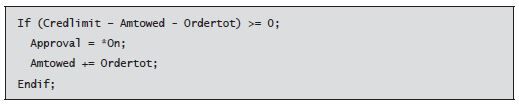
This code can be read, “If you subtract the customer’s outstanding balance (Amtowed) and the order total (Ordertot) from the customer’s credit limit (Credlimit) and the result (i.e., the remaining credit) is positive or zero, then approve the order and add the order total to the outstanding balance.”
Sometimes, you want to execute a series of instructions based on multiple tests or conditions. ILE RPG includes the binary operators And and Or to allow such multiple conditions. When you use And to set up a compound condition, both relationships must be true for the If to evaluate as true:

When you use Or to connect two relational tests, the If evaluates to true if one or the other (or both) of the conditions is true:

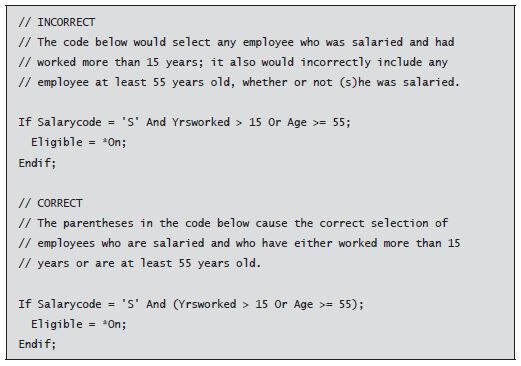
You can combine And and Or to create more complex conditional tests. Note that And is evaluated before Or. However, you can use parentheses to change the order of evaluation; parentheses are always evaluated first. If a conditional expression requires more room than a single specification offers, you can extend the expression to additional lines. To illustrate how And and Or are evaluated and to demonstrate the use of parentheses, we provide the following scenario. A company wants to print a list of employees eligible for early retirement. Only salaried employees are eligible (code = 'S'). Moreover, they must have worked more than 15 years for the company or be 55 (or more) years old. The following code shows an incorrect way and a correct way to express these conditions:
Else
You can also include an Else operation within an If group to set up an alternate path of instructions to be executed should the If condition be false. For example, to calculate pay and to pay time and a half for any hours over 40, you can code the following (using the + operator for addition and the * operator for multiplication):
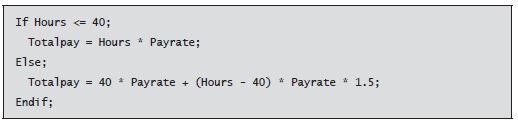
In this example, the first expression is executed if Hours is less than or equal to 40; otherwise, the second expression is processed. Only one Else operation is allowed in an If group. The Else operation does not require a corresponding exit point because all the statements are considered to be part of the same If group. The flow chart in Figure 5.1 illustrates the basic structure of the If group.
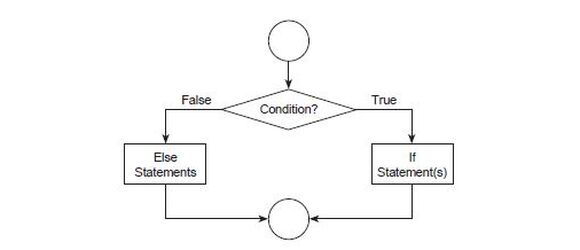
Figure 5.1: Flow chart illustrating If group
Nesting If Groups
You can also nest If groups. That is, you can build If groups within other If groups with or without Else operations. Each If requires an Endif in the appropriate spot to indicate the end point of that If group’s influence. The following example illustrates nested If logic in ILE RPG:
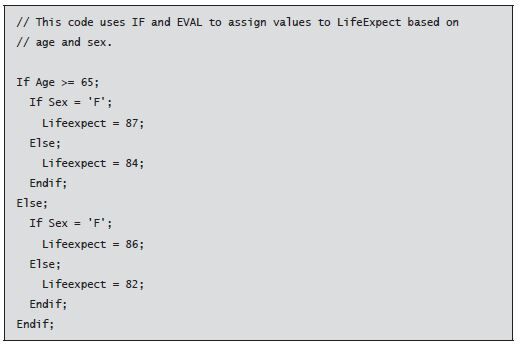
The flow chart in Figure 5.2 illustrates the basic structure of a nested If group.
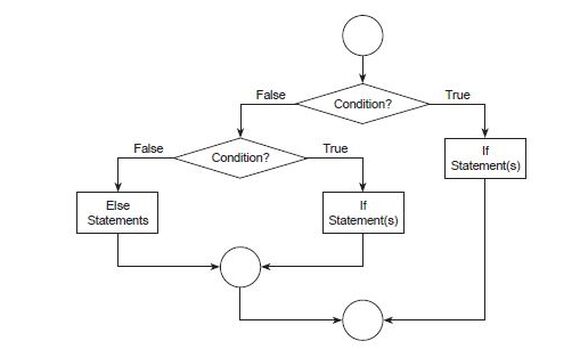
Figure 5.2: Flow chart illustrating nested If
Elseif (Else If)
Sometimes a program’s logic requires that nesting happen only on the Else branches of the decision structure. The following example of assigning commission rates typifies this kind of construct, sometimes called case logic:
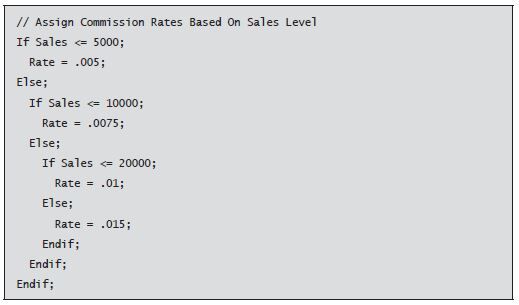
In the previous examples, each If statement requires its own corresponding Endif statement, resulting in a series of Endif statements to close individual nesting levels. As an alternative, the Elseif operation combines Else and If operations and requires only a single Endif at the end of the code block. The following example uses Elseif to simplify the nesting levels:
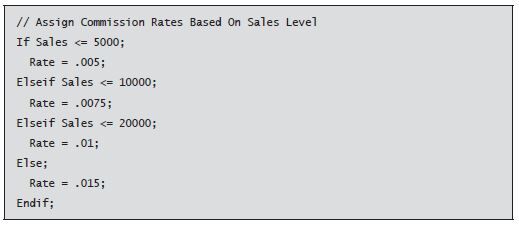
Figure 5.3 illustrates the basic structure of the Elseif operation.
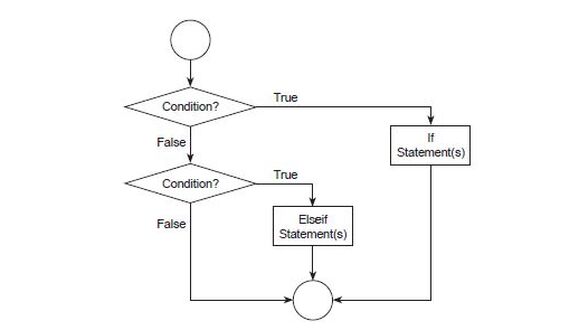
Figure 5.3: Flow chart illustrating Elseif
Notice in the examples presented so far in this chapter that the free-form syntax lets you indent code to make the logical groupings of conditions and the resulting actions more apparent.
Select (Conditionally Select Operations)
Although you can express even the most complex programming decisions with a series of If, Else, and Elseif operations, nested If groups can be difficult to set up and hard for others to interpret. To overcome this problem, ILE RPG uses the Select (Conditionally Select Operations) operation to let you simplify the coding of case logic.
The Select operation appears on a line alone to identify the start of a Select group. You follow the Select operation with one or more When lines, each of which specifies a condition to be tested. Next, you follow each When with one or more calculations to perform when that condition is met. When you execute the program, it checks the When conditions sequentially, starting with the first. As soon as it encounters a true condition, the computer executes the operation (or operations) following that When statement and then sends control to the end of the Select group, signaled by an Endsl (End Select) operation.
The following code uses Select to express the same logic for determining sales commission rates shown previously with nested If groups:
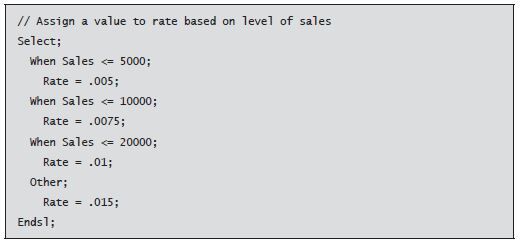
Notice in this example that the Other (Otherwise) operation code means in all other cases. Other, if used, should be the final catch-all condition listed. A Select group that includes an Other operation causes the computer to always perform one of the sets of calculations. When a Select group consists only of When conditions, no operation within the Select group is performed if no conditions are met.
Although not illustrated in the preceding example, just as in If operations, multiple operations can follow each When line—as many operations as you need to accomplish the desired processing on that branch of the Select group. You also can couple the When conditions with And and Or to create compound selection criteria, which can continue on multiple specification lines if needed.
The flow chart in Figure 5.4 illustrates the basic structure of a Select group.
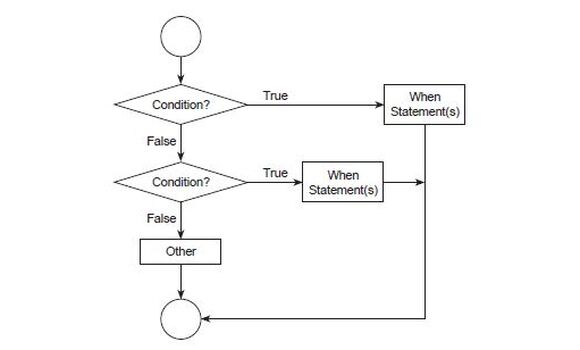
Figure 5.4: Flow chart illustrating Select
Iteration Operations
The third logical construct of structured programming is iteration. Iteration lets your program repeat a series of instructions—a common necessity in programming. In batch processing, for example, you want to execute a series of instructions repeatedly, once for every record in a transaction file. You have already used one ILE RPG operation that enables iteration, or looping: Dow.
Dow (Do While)
The Dow (Do while) operation establishes a loop based on a conditional test expression. All the operations coded between this operator and its corresponding end statement (Enddo) are repeated as long as the condition specified in the relational test remains true.
You have already used Dow to repeat processing while an end-of-file condition remains off. You can use Dow for other kinds of repetition as well. Assume you want to add all the numbers between 1 and 100. Using Dow lets you easily accomplish this summation, as in the following code:
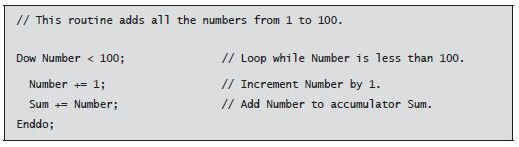
Notice that we manually incremented the variable Number inside the loop. This processing is necessary so that the program can escape the loop when the condition is no longer true. The conditional expression is tested during each iteration before the instructions within the loop are executed. If the condition is no longer true, control falls to the first statement following the Enddo operation. If no processing takes place to change the state of the condition, the resulting endless loop continues forever or until an error occurs.
Like ILE RPG’s decision operations, the Dow operation lets you use And and Or to form compound conditions to control the looping:
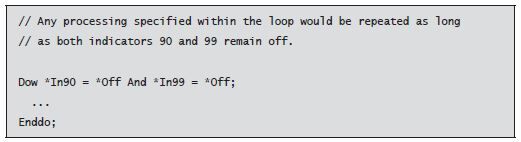
At some point during the processing inside the Dow loop, either or both indicators must have their values changed to *On to enable the program to eventually escape the loop.
Dou (Do Until)
Dou (Do Until) is a structured iteration operation similar to Dow. Like Dow, Dou includes a conditional test expression. However, two major differences exist between the two operations. First, a Dow operation repeats while the specified condition remains true, whereas a Dou operation repeats until the condition becomes true. Second, Dow is a leading- decision loop, which means the conditional expression is tested before the instructions within the loop are initially executed. If the condition is false, the computer completely bypasses the instructions within the loop. Dou, in contrast, is a trailing-decision loop. Because the condition is tested after the instructions within the loop have been executed, the instructions are always executed at least once. However, instructions within a Dow loop may not be executed at all.
Figure 5.5 presents flow charts of Do While and Do Until operations to illustrate their differences.
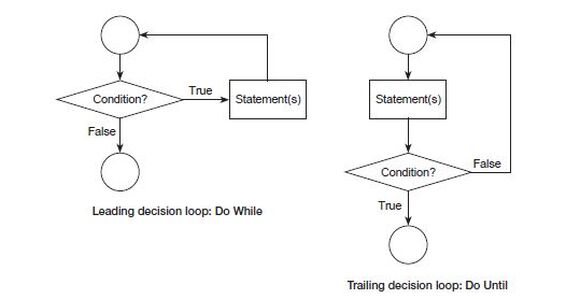
Figure 5.5: Do While vs. Do Until loops
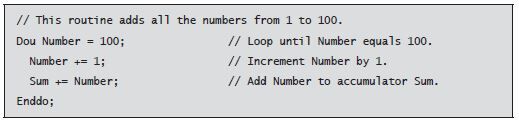
Dow and Dou are often equally suited to setting up a looping structure. For instance, you can use Dou to solve the add-the-numbers problem illustrated earlier with Dow—simply change the operation and the relational test. The following code illustrates how to solve this problem by using Dou:
For
Often, as in the previous example, you want to execute a loop a specific number of times. To implement this kind of logic with Dou or Dow, you define a field to serve as a counter. Each time the loop repeats, you must explicitly increment the counter as part of your loop instructions and check the counter’s value after each repetition to determine whether another iteration is needed. Dow and Dou are condition-controlled loops, meaning that whether the loop continues depends upon testing a condition.
ILE RPG offers the For operation designed specifically for count-controlled loops (i.e., for executing loops a specific number of times). Like Dow and Dou, an end operator (Endfor) signals the end of a For group. Unlike those operations, the For operation automatically increments its counter to ensure the repetition occurs the desired number of times.
The For operation’s format is a little more intricate than that of Dow or Dou because For provides more options and defaults. The general layout of a For loop is as follows:

In general, the For operation lets you specify four things:
- a variable to serve as the counter
- the starting value of the counter
- the maximum value of the counter for looping to continue
- the amount to add to the counter at the end of each repetition of the loop
Although ILE RPG lets you optionally specify these four values, you also can omit any of them except the counter field.
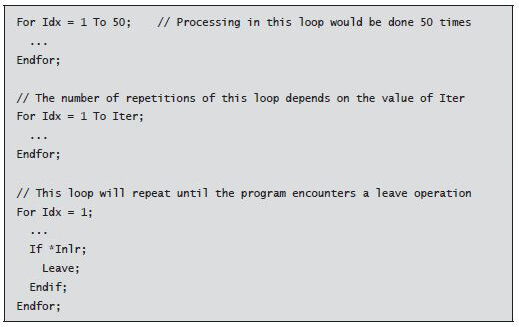
The counter variable must be defined as a numeric variable (preferably an integer) with zero decimal positions. You can omit the initial value for the counter, but if you do, the counter begins with the same value it had before the program entered the For loop.
In the To clause, specify a whole numeric variable, constant, or literal as a limit value. If your limit value is a variable, its value determines the number of repetitions. You can also omit the To clause, but doing so continues the loop indefinitely until the program processes a Leave operation, which we examine shortly.
The By clause specifies a whole numeric variable, constant, or literal as the increment value. If your increment value is a variable, its value determines the increment value. You can also omit the By clause. If you do, ILE RPG assumes an increment value of 1; that is, it adds 1 to the counter’s value at the start of each additional pass through the loop. In the unlikely event that you need to decrement a counter instead of incrementing it, the For operation offers a variation that works in reverse, using a Downto clause.
The following examples illustrate the For loop:
The following code shows the add-the-numbers problem implemented by using For:

A For loop is a leading-decision loop, which means the value of the counter is tested against the limit value before the instructions within the loop are executed for the first time. If the counter has not exceeded the limit value, the instructions are processed repeatedly until the counter exceeds the limit. In the preceding example, after the loop is done processing, Number has a value of 101.
Next time: Loops and Early Exits and more. Buy Programming in ILE RPG, Fifth Edition at the MC Press Bookstore today!

Jim Buck's career in IT has spanned more than 35 years, primarily in the college education, manufacturing, and healthcare industries. Past president (13 years) of the Wisconsin Midrange Computer Professional Association, he has served on several teams developing IBM and COMMON certification tests. Jim has co-authored several IBM i textbooks with Bryan Meyers that are used by many companies and in colleges worldwide. Other accomplishments include: recipient of the 2007 IBM System i Innovation - Education Excellence Award, 2014 COMMON President's Award, and 2013/2016/2017 IBM Champion - Power Systems.
Jim is the president and founder of imPower Technologies, where he provides professional IBM i training and consulting services. He is active in the IBM i community, working to help companies train their employees in the latest IBM technologies and develop the next generation of IBM i professionals.
MC Press books written by Jim Buck available now on the MC Press Bookstore.
 |
||
 |
|
Control Language Programming for IBM i Master the A-Z of CL, including features such as structured programming, file processing enhancements, and ILE. List Price $79.95 Now On Sale
|
|
||
 |
|
Mastering IBM i Get the must-have guide to the tools and concepts needed to work with today's IBM i. List Price $85.95
Now On Sale
|
|
||
 |
|
Programming in ILE RPG Get the definitive guide to the RPG programming language. List Price $95.95
Now On Sale
|
|
||
 |
|
Programming in RPG IV Understand the essentials of business programming using RPG IV. List Price $79.95
Now On Sale
|

 Business users want new applications now. Market and regulatory pressures require faster application updates and delivery into production. Your IBM i developers may be approaching retirement, and you see no sure way to fill their positions with experienced developers. In addition, you may be caught between maintaining your existing applications and the uncertainty of moving to something new.
 IT managers hoping to find new IBM i talent are discovering that the pool of experienced RPG programmers and operators or administrators with intimate knowledge of the operating system and the applications that run on it is small. This begs the question: How will you manage the platform that supports such a big part of your business? This guide offers strategies and software suggestions to help you plan IT staffing and resources and smooth the transition after your AS/400 talent retires. Read on to learn:
LATEST COMMENTS
MC Press Online