









In my last article, we discussed AI in general, particularly the difference between Generative and Agentic AI. Now we want to look specifically at the i and how AI fits into that environment. And we will start by looking at automatic RPG code generation.
By David Shirey
Until last fall, we thought that the path to autogenerated i RPG code would be Watsonx.ai. But that tool, which was based on the IBM Granite model, was maturing too slowly to keep up with the competition from Claude and several other products, so it was put on the shelf. A new tool, Bob, was built by taking aspects from Mistral, Anthropic, Meta, and Granite to develop a generator that is more robust than Watsonx.ai.
Some Facts About Bob
Bob is a Software Development Lifecycle Tool, oriented around code generation and modernization.
At this point, Bob runs on your PC just like VSC, with versions for Windows, Mac, and Linux, and for the last two, separate versions for different hardware configurations. You can download it from https://bob.ibm.com/download.
This means that for Bob Version 1.0.1, you will have to host the code you are developing on your PC rather than the i. This is not the end of the world, sort of, but it does mean that you will have to upload everything you create in Bob to the i for compiling and testing. If you are making a mod, then you need to download from the i, do what you need to, and then upload back to the i. The ultimate goal is to have it run directly on the i (perhaps when Bob Premium is announced), but there is no set timetable for that.
Bob is based on a VSC framework, so it will look very familiar to those of you who use VSC. If you have just been working in PDM, you might want to download a copy of VSC (https://code.visualstudio.com ) to your PC and start getting used to it. Once you understand how VSC operates, Bob will look very familiar.
Pricing
Bob is not free. Like RDi, there is a subscription associated with it. And you can choose a plan that fits your needs. Currently, there are five to choose from: Free, Pro, Pro+, Ultra, and Enterprise. Prices vary depending on the plan.
The Free tier comes with an asterisk: you do get 40 bobcoins, but it only lasts for 30 days. After that, you have to choose a paid plan to continue using Bob.
Pro is $20 a month plus a $3 support fee with 40 bobcoins per month,
Pro+ is $60 plus a $9 support fee with 160 bobcoins per month,
Ultra is $200 plus a $30 support fee with 500 bobcoins per month.
There is no set price for Enterprise. The price and bobcoins will be tailored to each client. There are extra features with this plan, such as invite and manage team members, pooling bobcoins, bobcoin limits for teams/users, bobcoin budgets and tracking, plus priority support.
It appears that if you use up all your available bobcoins before the month is over, you have two options. One is to stop using Bob until the next month’s supply comes. Or, you can upgrade to the next plan for that month and get more bobcoins. I would assume you can drop back down again, but I haven't seen that in writing. In any case, be warned that it is a use-them-or-lose-them proposition, and any extra bobcoins you have at the end of the month will disappear. I guess you can screw around with your plan to ensure you always have bobcoins, going up and down as necessary. Not sure why IBM doesn’t just sell extra bobcoins, but I am sure there is a real, solid reason.
How Fast Do Bobcoins Get Used Up
That’s the real question, isn’t it? And I can’t really tell you. My advice is to get some experience with a project or two and see what’s used up. For a guide, here is what I have found online.
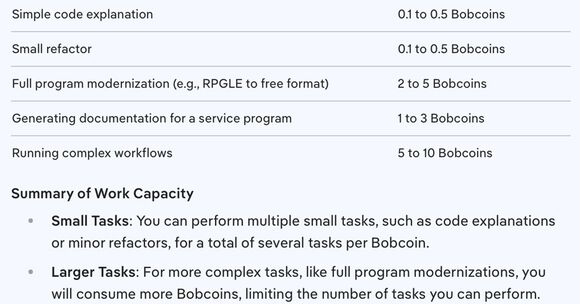
Figure 1 – IBM Doco, Welcome to IBM Bob.
Features
Except for the Enterprise plan, there is no difference in the features across plans. The only difference is the number of bobcoins available per month.
Bob has five modes you can work in.
Plan Mode – Perform design and project planning before coding.
Code Mode – Write, modify, refactor code.
Ask Mode – Q&A Bob about your codebase.
Orchestrator – For complex projects with many tasks and interrelationships.
Advanced Mode – Provides unrestricted access to all tools when doing a complex project.
In addition, Bob comes with a set of tools or commands to carry out its work.
Read Tools – Read, search, and list options.
Write Tools – Write, apply (for refactoring), and insert.
Command Tools – Execute type commands.
Mode Tools – Allow you to switch the mode.
Question Tools – Allow you to access additional information and details.
MCP Tools – Allows you access to the MCP server, which handles connections to the outside world.
MCP, per se, is a protocol that allows your AI to communicate with other external services easily. It is sometimes referred to as an MCP server, but that means a regular old server with the MCP protocol embedded. Although it can be used to access a variety of services, one of its main uses is to enable Bob to retrieve data from a database without a specific handler for that database.
Getting Started with Bob
The first step, of course, is to download and then open Bob on your PC. You can get Bob from https://bob.ibm.com/download.
After you download and open Bob, the initial Bob screen appears, and there will be a ‘Log In’ button near the bottom-right corner. This will involve actually signing in to the IBM site and maybe saying ‘OK’ a couple of times, but keep going, and before you know it, the main Bob screen will show up. There are no separate sign-in credentials for Bob, just your normal IBM sign-on.
You will also be asked to clone a repository and then attach it to a folder on your PC. This is where the stuff that you create will be saved. If you don’t do this step, I believe it will dump everything onto your desktop. Your best bet is to clone the repo at https://github.com/IBM/bob-demo.git, as it contains several files related to Bob.
There is a lot of stuff on the initial Bob screen, and you will notice that it does indeed look like VSC. The prompt window is down in the lower-right corner. This is where you will tell Bob what you want it to do. Let’s say we want to ‘Create an RPGLE /Free program to display the Customer Master File.’ Type that in the prompt window and hit Enter. Also, at this point, note that you are in the ‘Plan’ mode, as evidenced by the word ‘Plan’ at the very bottom of the right column.
Bob will do some thinking and maybe ask one or two more questions in the area directly above the Prompt window, and after a moment or two, come back with a plan for how to accomplish this. You don’t get code at this point, just a plan that you can change or approve. In this case, since I don’t have a Customer Master File already defined, there are more elements in the plan than you might expect.
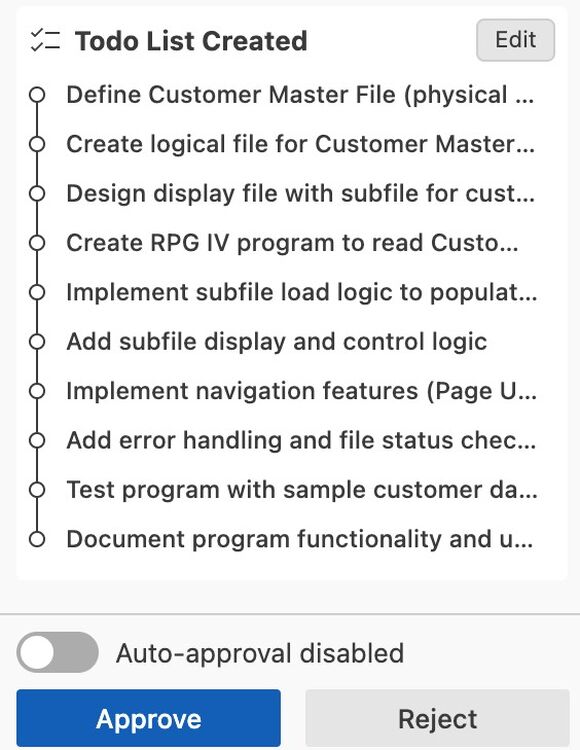
Figure 2 – Screen Shot, IBM Bob.
Auto-approval is turned off by default, so Bob will ask you whether you want to accept the plan as is or modify it.
If you accept it, Bob will work very hard again for a moment or two and then present a more detailed plan describing what you have to do and how the program will be structured. Again, it will ask you to either edit the result or approve it. That will then display the window below in the right column of the screen. For the file and screen fields, it selects a few that are appropriate for the file, but assumes you will edit to establish the exact fields you want. I guess it’s up to you whether you want to build the file in Bob or drop the specs into the repo so Bob can automatically pick them up.
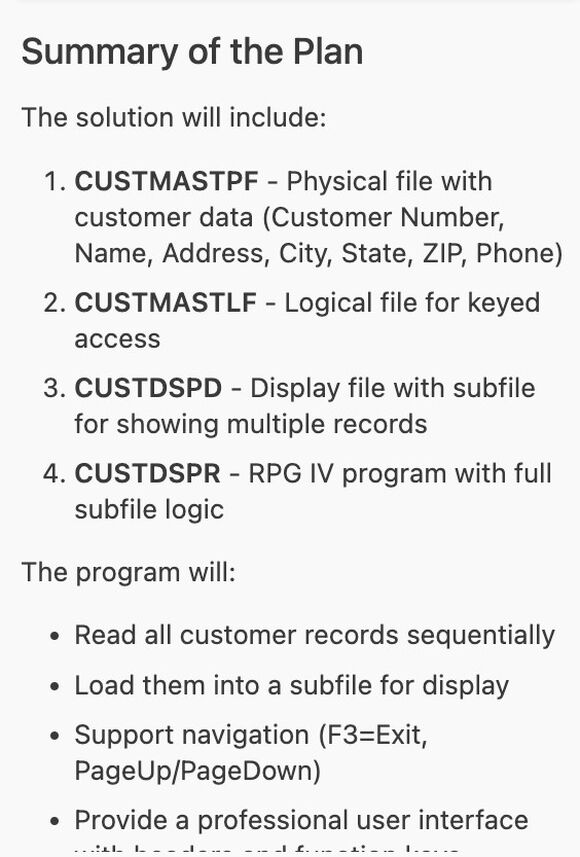
Figure 3 – Screen Shot, IBM Bob.
If you scroll to the bottom of the top part of the right column, you will find a note telling you to switch to ‘Code’ mode (which you do by clicking on the carrot next to ‘Plan’ and selecting, yes, you got it, ‘Code’).
You then have to approve the plan above, or, if you have issues with the plan, scroll up and use the edit box to change the To Do List. Once again, Bob goes to work, and after a pretty bright flash of light and a very loud bang, the code it is creating will appear in the center window of the screen. Since I specified /Free in the prompt, it has created it as such. If I hadn’t said /Free, it would have done regular old RPGIV.
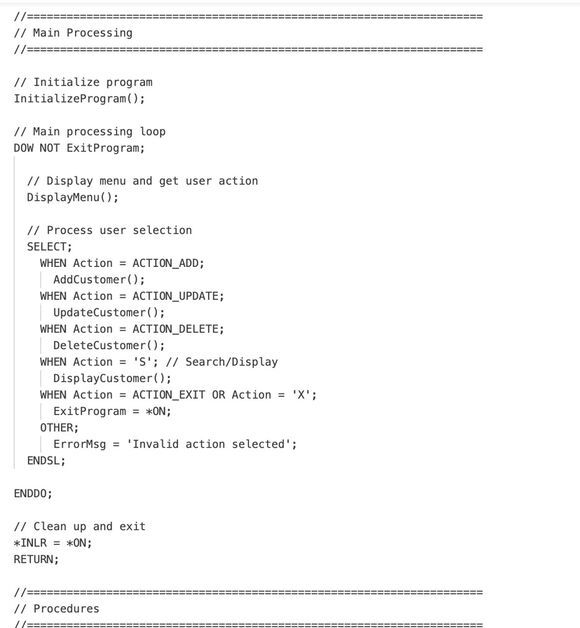
Figure 4 – Screen Shot, IBM Bob
I have to say, at this point, that the code it writes looks pretty good. It is well organized, very visible, commented, and uses sub-procedures to do the dirty work.
Once more, like you have nothing else to do, it will ask you to save the module. If you want to make changes, you can make them directly on the Bob screen. You can change, delete (highlight the line to be removed and hit Delete on your keyboard), or add lines (by hitting Enter at the end of the line above where you want to add a blank line). Maybe even move code around, although I didn’t try that. Forgot actually.
One by one, you will go through the modules that ole Bob has built for you. In my case, it created a Customer Master file, a logical file to read the Customer Master file, a display file, and the RPGLE program itself. It will also create a CL to compile everything (using the command defaults, but you can change them by editing the CL), plus a program that will generate and load sample data into the customer master file for testing. Documentation is included in the modules, lest we forget. Each module must be saved separately (in the folder you attached to the cloned repository), and Bob will cycle through them for you.
The next step will then be to upload them to the i, compile, and test.
Conclusion
And that is a short intro to Bob. There is a lot more to the product, even in this initial release, and it will take you some time to learn it all. A good place to start is the Introduction to Bob webpage at https://bob.ibm.com/docs/ide.
But Bob is only one of several tools you can use to auto-generate RPG. In the next article, we will take a look at a couple of others. In the meantime, sign up for the Free Trial (there is a button on the initial Bob screen) and give it a whirl.

David Shirey is president of Shirey Consulting Services, providing technical and business consulting services for the IBM i world. Among the services provided are IBM i technical support, including application design and programming services, ERP installation and support, and EDI setup and maintenance. With experience in a wide range of industries (food and beverage to electronics to hard manufacturing to drugs--the legal kind--to medical devices to fulfillment houses) and a wide range of business sizes served (from very large, like Fresh Express, to much smaller, like Labconco), SCS has the knowledge and experience to assist with your technical or business issues. You may contact Dave by email at
MC Press books written by David Shirey available now on the MC Press Bookstore.
 |
||
 |
|
21st Century RPG: /Free, ILE, and MVC Boost your productivity, modernize your applications, and upgrade your skills with these powerful coding methods. List Price $69.95 Now On Sale
|

 Business users want new applications now. Market and regulatory pressures require faster application updates and delivery into production. Your IBM i developers may be approaching retirement, and you see no sure way to fill their positions with experienced developers. In addition, you may be caught between maintaining your existing applications and the uncertainty of moving to something new.
 IT managers hoping to find new IBM i talent are discovering that the pool of experienced RPG programmers and operators or administrators with intimate knowledge of the operating system and the applications that run on it is small. This begs the question: How will you manage the platform that supports such a big part of your business? This guide offers strategies and software suggestions to help you plan IT staffing and resources and smooth the transition after your AS/400 talent retires. Read on to learn:
LATEST COMMENTS
MC Press Online