









The new AUTHORITY_COLLECTION_IFS service simplifies analysis of the information collected by Authority Collection for IFS objects.
By Sarah Mackenzie
When determining your security strategy, knowing which authorities to grant — and ensuring you don't grant too much — is essential. Granting excess authority gives a user the ability to do things they shouldn’t be allowed to do. The question that is often asked, however, is how do I know what excess authority I can subtract without breaking my applications? Authority Collection can help you to answer this question.
Authority Collection is a tool used to capture information about the requested authority during runtime authority checks. This can help you identify the minimum required authority that a user needs to do their job. This information can be collected for either a specific (or multiple) user profiles, or it can be captured for all users who access a particular object. We can collect information not only on library objects but also on Integrated File System (IFS) objects, including both directories and stream files.
To understand and analyze the information collected, several SQL views are available. These views can be used to query the collected data—for example, the QSYS2.AUTHORITY_COLLECTION_LIBRARIES view is used to query information collected for libraries and their objects, while the QSYS2.AUTHORITY_COLLECTION_FSOBJ view was initially provided to query the information collected for IFS objects. These services share similar columns and terminology to provide commonality across the different Authority Collection views. However, in practice, this standard approach is problematic because the IFS uses both different vocabulary and a different security model than is used for library objects.
Both database objects and IFS objects have object authorities (OBJAUT) and data authorities (DTAAUT). Data authorities consist of *OBJOPR, *READ, *ADD, *UPD, and *DLT, while object authorities consist of *OBJMGT, *OBJEXIST, *OBJALTER, and *OBJREF. The IFS-specific *RWX (read, write, execute) authorities apply only to data authorities, not to object authorities. This differs from database authorities, where *ALL, *CHANGE, and *USE authorities apply to both object and data authorities. The QSYS2.AUTHORITY_COLLECTION_FSOBJ view does not show the *RWX data authority information, and instead only shows the library-centric object authorities and data authorities. This view also includes columns that are not relevant to the IFS, which can be confusing and misleading.
To solve these problems, the new QSYS2.AUTHORITY_COLLECTION_IFS view was created. The QSYS2.AUTHORITY_COLLECTION_IFS view returns the name of the user who requested access to the object, the time the request was made, the path name of the object, the object type, the detailed required authority, and whether the request was successful or not. The detailed required authority shows the *RWX required authority. Additional information, such as the user’s current authority, the source of that authority, the job name, and other information applicable to IFS objects, is also returned. Columns that are not relevant to IFS objects are removed from this view. Additionally, for the new view, a change was made to only show user activity in the view. In the original view, system activity would also be shown. These rows depicting system authority requests were confusing and not relevant. By removing them, you can now focus on the user’s activity.
Let’s look at an example.
First, let’s create a directory and two IFS objects in the directory.
-- Make the directory
CL: MKDIR DIR('/home/TestDirectory');
-- Create the files in the directory
CALL IFS_WRITE(PATH_NAME => '/home/TestDirectory/test1.txt',
LINE => 'My test data 1');
CALL IFS_WRITE(PATH_NAME => '/home/TestDirectory/test2.txt',
LINE => 'My test data 2');
Next, let’s set up Authority Collection by object. In this case, we will collect information about the ‘/home/TestDirectory’ directory, specifying the SUBTREE(*ALL) option to collect data on both the directory and objects in the directory. Then we will turn on Authority Collection by object.
-- Setup authority collection for our test directory
cl:CHGAUTCOL OBJ('/home/TestDirectory') AUTCOLVAL(*OBJINF) SUBTREE(*ALL);
-- Turn ON Authority Collection by object
cl:STRAUTCOL TYPE(*OBJAUTCOL);
If you are using IBM i Access Client Solutions (ACS), you can prompt on the commands to see your options. For example, for CHGAUTCOL, if you prompt, you will see the following options.
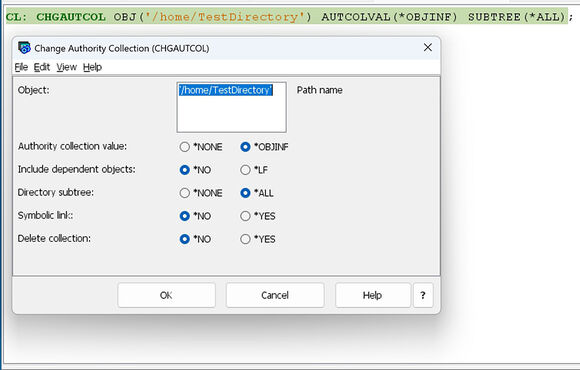
Figure 1: Example of prompt on CL command CHGAUTCOL
That is all we need to do to turn on Authority Collection for our example IFS objects.
Typically, at this point, you would run your application to determine which authorities are required for the objects when the application is run. However, for this example, let’s attempt to read and write to our files. We will use the IFS_READ and IFS_WRITE SQL services for convenience here, but any method of access (APIs, CL commands, SQL, etc.) would result in the collection of information.
-- Write to the first stream file
CALL QSYS2.IFS_WRITE(PATH_NAME => '/home/TestDirectory/test1.txt',
LINE => 'Second line of data',
OVERWRITE => 'APPEND',
END_OF_LINE => 'CRLF');
-- Read from the second stream file
SELECT * FROM
TABLE(QSYS2.IFS_READ(PATH_NAME => '/home/TestDirectory/test2.txt',
END_OF_LINE => 'CRLF'));
Now that we’ve collected our information, let’s turn off Authority Collection.
-- Turn OFF Authority Collection by object
cl:ENDAUTCOL TYPE(*OBJAUTCOL);
Finally, let's look at what was collected for these operations.
SELECT AUTHORIZATION_NAME,
PATH_NAME,
SYSTEM_OBJECT_TYPE,
DETAILED_REQUIRED_AUTHORITY,
DETAILED_CURRENT_AUTHORITY
FROM QSYS2.AUTHORITY_COLLECTION_IFS
WHERE path_name LIKE '/home/TestDirectory%';

Figure 2: Results of querying QSYS2.AUTHORITY_COLLECTION_IFS
We can see that to run the IFS_WRITE to test1.txt file and IFS_READ to the test2.txt file, the SAMACKEN user profile needs Read (*R) authority to ‘/home/TestDirectory/test2.txt’, Write (*W) authority to ‘/home/TestDirectory/test1.txt’, and Execute (*X) authority to the ‘/home/TestDirectory’ directory. Now that we see what authority was required, we can compare it with the user’s actual authority and determine if they have excess authority. If they do have excess authority, we can remove it.
QSYS2.AUTHORITY_COLLECTION_IFS was provided in the IBM i 7.6 base and with IBM i 7.5 TR6. For more information, see https://www.ibm.com/support/pages/node/7229427. For more examples of how to use Authority Collection, you can use IBM i Access Client Solutions “Insert from Examples” in Run SQL Scripts.
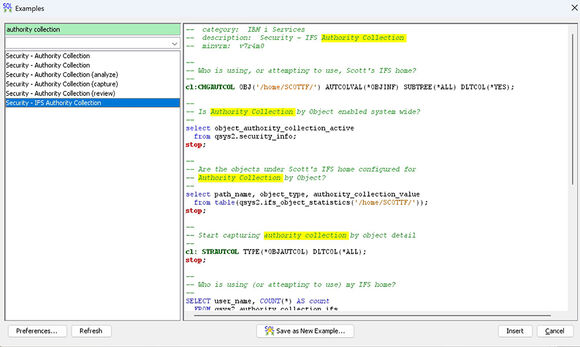
Figure 3: Example of ACS “Insert for examples”

 Business users want new applications now. Market and regulatory pressures require faster application updates and delivery into production. Your IBM i developers may be approaching retirement, and you see no sure way to fill their positions with experienced developers. In addition, you may be caught between maintaining your existing applications and the uncertainty of moving to something new.
 IT managers hoping to find new IBM i talent are discovering that the pool of experienced RPG programmers and operators or administrators with intimate knowledge of the operating system and the applications that run on it is small. This begs the question: How will you manage the platform that supports such a big part of your business? This guide offers strategies and software suggestions to help you plan IT staffing and resources and smooth the transition after your AS/400 talent retires. Read on to learn:
LATEST COMMENTS
MC Press Online