









Learn how to use one of IBM’s most powerful and underused security features.
By Pauline Brazil Ayala
So often, people are hesitant to make authority changes because they are afraid of breaking something, and understandably so. With Authority Collection, however, you can essentially follow a user’s activity on the system and see exactly the authority needed to perform tasks and compare that directly to the current authorities of the user in question. This lets you clearly see the minimum authority required for users to perform their job functions. It is a game changer and can really help you eliminate a lot of security risk exposure.
Authority Collection was introduced to IBM i OS in 7.3 for users and in 7.4 for objects, and it is a great resource for determining the least amount of privilege your users need and reducing excessive privileges on your system.
One of the main reasons organizations want to implement the least privilege security model is to comply with security regulations, since many major regulations, like PCI DSS, require users to operate with only the minimum amount of privilege necessary to do their jobs. Another reason is that it’s smart to use this security best practice to reduce your system's threat landscape, especially since there are many ways to access data objects on an IBM i besides directly through an application.
So, how does it work? Let’s walk through an example of using authority collection to analyze a simple application and reduce privilege levels. This will hopefully give you a better understanding of the type of data authority collection can provide and how it can be useful in implementing a least privilege security model on your IBM i.
As I mentioned, authority collection can be object-based or user-based. As shown here in Figure 1, I’m going to run authority collection on user ANDY and, since I know ANDY only uses this one application on the system, I’m going to limit collection for him to the CUSTOMER library. In order to use the authority collection commands, you must be signed on as a user with all object (*ALLOBJ) special authority or be authorized to the Database Security Administrator function of IBM i (QIBM_DB_SECADM).
STRAUTCOL TYPE(*USRPRF) USRPRF(ANDY) LIBINF((CUSTOMER))
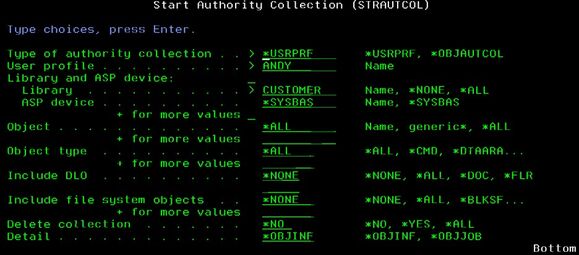
Figure 1: Start authority collection for a user.
To confirm a user has authority collection started, you can display the user profile and see that the “Authority collection active” field has a “Yes” value (see Figure 2).
DSPUSRPRF USRPRF(ANDY) TYPE(*BASIC)

Figure 2: Display user profile details showing authority collection fields.
If you need to see a list of users who have authority collection active, you can also use Run SQL Scripts to query the QSYS2.USER_INFO SQL view with this SQL statement:
SELECT *
FROM QSYS2.USER_INFO
WHERE authority_collection_active = ‘YES';
Now that authority collection is started for ANDY, we’ll have him run through the test application and then take a look at what the authority collection data looks like.
To do a full analysis, the user must execute all application functions required for their job. This will give you the most complete view of the authorities the user really needs.
The data gathered in an authority collection repository can be viewed by querying the QSYS2.AUTHORITY_COLLECTION SQL view through Run SQL Scripts in Access Client Solutions (ACS). (ex: SELECT * FROM QSYS2.AUTHORITY_COLLECTION)
Since there are a lot of columns in this data, I’ve selected certain ones for this example, and we’re going to look at entries specific to user ANDY in the CUSTOMER library.
Here is the SQL query I’m using over the QSYS2.AUTHORITY_COLLECTION SQL view:
SELECT authorization_name,
path_name,
system_object_name,
system_object_type,
object_attribute,
detailed_required_authority,
detailed_current_authority,
authority_source
FROM QSYS2.AUTHORITY_COLLECTION
WHERE authorization_name = 'ANDY'
and system_object_schema = 'CUSTOMER'
ORDER BY check_timestamp DESC;

Figure 3: Results of querying authority collection data in ACS Run SQL Scripts - showing detailed required authority is much less than the current authority, and that the current authority is coming from the user’s *ALLOBJ authority.
For this example, ANDY ran an application program that read the CUSTMAST file. In the authority collection data shown in Figure 3, the Detailed Required Authority shows the minimum authorities required by ANDY to perform the task were *OBJOPR and *READ, which means he needed object operational and read authority. You can also see that the Detailed Current Authority that ANDY had at the time was *OBJEXIST, *OBJMGT, *OBJALTER, *OBJREF, *OBJOPR, *READ, *ADD, *DLT, *UPD, and *EXECUTE, and that the source of the authority he had was from his user profile’s all object authority (USER *ALLOBJ).
This shows that ANDY only needs read-only authority to the file, while the excess authority grants him full access to the file without restriction.
Since the authority collection entry points to the *ALLOBJ special authority of the user as the source of authority that was used for the successful authority check, and I know for certain ANDY does not need special authorities for anything else on the system, I will remove all special authorities assigned to him by running the following command.
CHGUSRPRF USRPRF(ANDY) SPCAUT(*NONE)
Changing special authorities of user profiles should be done only after full analysis of the user profile has taken place, with all applications and job functions of the user in scope of the analysis. This always includes any non-interactive functions on the system as well, such as batch jobs, month-end processing, or remote jobs that run through a different interface. Anything where the user is the current user of the job.
After the special authority change, when ANDY runs the application again, the following authority collection entry in Figure 4 is generated.

Figure 4: Authority collection data after reducing ANDY’s special authority shows *PUBLIC as the authority source granting excessive privilege to the CUSTMAST file.
Note that we can now see ANDY still has more authority than he needs for the CUSTMAST file. The detailed required authority is *OBJOPR and *READ, while the detailed current authority has several additional authorities that still allow him to add, delete, and edit records in the file. This time, the entry shows that the authority source is the PUBLIC authority on the file.
If we look at the CUSTMAST file (see Figure 5) using the DSPOBJAUT command, we can see that *PUBLIC has *ALL authority, meaning all users on the system who do not have specific authority to the file have full access to it.
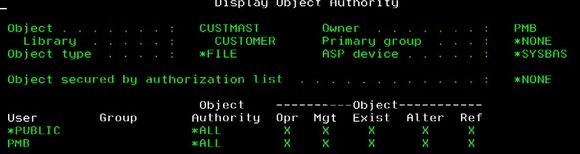
Figure 5: CUSTMAST object authorities.
It is very important to note that before directly changing authorities to an object, you want to make sure to do your analysis on all users of the application, or at least a good sampling of users of the application so that you have representation in your analysis of every group of users based on job function. Analysis would have to be done on every entry about a particular object if you want to make changes to the object, and every entry about a particular user if the user’s special authorities are in question.
For the purposes of keeping this example simple, I’m going to go ahead and change the *PUBLIC authorities for this file now to *USE using the edit object authority (EDTOBJAUT) command so you can see the difference in the authority collection entry afterward. (See Figure 6.)
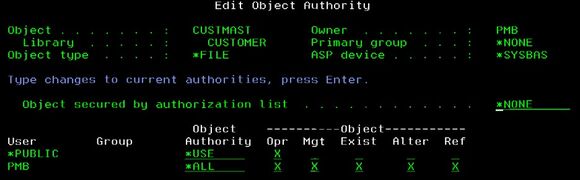
Figure 6: Editing CUSTMAST object authorities.
Note that for the purposes of this example, I have kept the application and the authorities very simple. In a typical application with many objects, it is very helpful to use an authorization list to secure *PUBLIC, with group profiles on the authorization list to give users the authority they need for the application. The authorization list would be named in the “Object secured by authorization list” field, and the object authority for *PUBLIC would point to that authorization list by specifying *AUTL. Then access for all other users can be restricted by setting *PUBLIC to *EXCLUDE in the authorization list itself.
When ANDY uses the application again, you can see in Figure 7 that the excess authorities in the detailed current authority column of the generated authority collection entry have significantly decreased. Since the application ANDY is running just reads a file, the required authorities are *OBJOPR and *READ, while the current authorities listed (*OBJOPR, *READ, and *EXECUTE) represent the bundled underlying object and data authorities of *USE and limit access to the file to read-only.

Figure 7: Authority collection data.
Now that the permissions have been adjusted to reflect the minimum authority needed for the application, I can end authority collection for the user with the End Authority Collection command.
ENDAUTCOL TYPE(*USRPRF) USRPRF(ANDY)
Displaying the user profile will now show that authority collection has stopped for this user, but it will also indicate that an authority collection repository still exists for the user. (See Figure 8.)
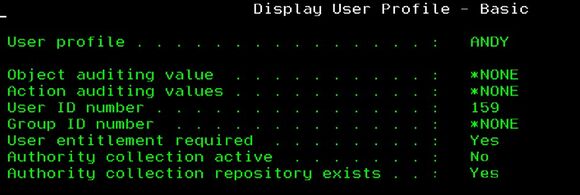
Figure 8: User profile details showing authority collection values.
If the authority collection entries that were collected for ANDY during the analysis are no longer needed, the repository that was created to store the entries can be deleted using the Delete Authority Collection command.
DLTAUTCOL TYPE(*USRPRF) USRPRF(ANDY)
It would be typical to retain the authority collection data until after all analysis is complete, and all testing, verification, and any audit requirements have been carried out.
Additional Considerations
Authority collection can generate a very high volume of detailed data for the authority checks performed on the user or object that authority collection is started on, including checks by the OS and LIC. Because of this, it is recommended to run authority collection in a test environment so that runtime performance of an application in a production environment is not impacted. It is also a good idea to target your analysis as much as possible.
Likewise, any authority changes that are intended to be made to user profiles or objects after the authority collection analysis is performed should always be fully tested in a test environment before being implemented in production.
Reviewing applications for excessive permissions and reducing them to only what is required is an excellent way to reduce unnecessary business risk. This exercise also helps you stay compliant with many security regulations and best practices, while reducing the risk of unintended or unauthorized access to resources, especially in scenarios where a network is breached and users are compromised.
Keep in mind - implementing a least privilege security model does not mean you have to do everything at once. You can start small. Maybe there is a file with particularly sensitive information that needs stronger security. Or maybe you have users you know have too much authority, but you don’t know how to gauge what authority they really need. Authority collection may be just the tool you need to gather the information required to start moving toward your least privilege security goal.
 Pauline Brazil Ayala is Senior Security Advisor at Fresche Solutions. Pauline is an IBM i security expert with over 25 years of experience in developing enterprise-level security software. Her involvement has spanned the entire spectrum of software production, from initial requirements gathering to final delivery, including sales and ensuring ongoing customer satisfaction.
 Business users want new applications now. Market and regulatory pressures require faster application updates and delivery into production. Your IBM i developers may be approaching retirement, and you see no sure way to fill their positions with experienced developers. In addition, you may be caught between maintaining your existing applications and the uncertainty of moving to something new.
 IT managers hoping to find new IBM i talent are discovering that the pool of experienced RPG programmers and operators or administrators with intimate knowledge of the operating system and the applications that run on it is small. This begs the question: How will you manage the platform that supports such a big part of your business? This guide offers strategies and software suggestions to help you plan IT staffing and resources and smooth the transition after your AS/400 talent retires. Read on to learn:
LATEST COMMENTS
MC Press Online