









Learn how to use SQL and HTTP functions to retrieve information from web services easily.
At times, our applications need access to information that is not contained in the database. This information can cover topics from current weather forecasts to financial data to location information and many other relevant bits of data. This type of information can be accessed online, programmatically, through web services.
A web service is a self-contained piece of software accessible over the internet through a defined interface. It is a platform, design, and environmentally independent of your applications. Typically, JSON is used to encode communications to and from the web service. You invoke a web service by sending it a message and then waiting for a response through the interface it defines.
Db2 for i provides HTTP functions that can be used to make requests to a web service using RESTful services via SQL. Initially, the Db2 for i HTTP functions were provided as SYSTOOLS services; now, however, more powerful (and continually updated) versions exist in QSYS2. These QSYS2 services have lower overhead and do not require creating a JVM. If you are currently using the SYSTOOLS versions, consider upgrading to the current version of these services to benefit from lower overhead and other enhancements like HTTP authentication, proxy support, configurable redirect attempts, and configurable SSL options. Additionally, recent TRs have included continual enhancements to the QSYS2 HTTP services such as improved header options (See https://www.ibm.com/support/pages/node/6486889 for more information about recent enhancements).
Web services provide APIs (Application Programming Interface) to access a web service programmatically. These APIs are publicly exposed endpoints, and the API’s provider will define how to access their RESTful services using HTTP via a URL.
For example, weather.gov provides multiple APIs to retrieve weather data, including forecasts, alerts, and other information. Their website documents and defines their APIs here https://www.weather.gov/documentation/services-web-api#. Currently, there is no API key or authentication needed to access this service, but this may change in the future. They offer the following example URL to retrieve weather information from their web service based on location.
https://api.weather.gov/gridpoints/{office}/{gridX},{gridY}/forecast
The office, gridX, and gridY define the location for which we wish to retrieve a weather forecast.
They give the following URL as an example: https://api.weather.gov/gridpoints/TOP/31,80/forecast
By going to this URL, a JSON document will be retrieved that contains information about the weather forecast for the next week at the location defined by the office, gridX, and gridY. The location in the example points to the center of the United States. We can modify the URL to retrieve weather forecasts for various places. For example, let’s retrieve the forecast information for Rochester, Minnesota. First, we need to find the gridpoint coordinates for Rochester. We can do that using a different API defined as https://api.weather.gov/points/{latitude},{longitude}, substituting the latitude and longitude values for Rochester (44.0583, -92.5036) to get the following URL:
https://api.weather.gov/points/44.0583,-92.5036
This returns a JSON document that contains the local office (ARX) and coordinates (21,73) as well as the following URL that uses those office and coordinate values:
https://api.weather.gov/gridpoints/ARX/21,73/forecast
This URL returns a JSON document that contains the weather forecast for Rochester, MN.
To access this information programmatically using SQL, we will use the Db2 for i HTTP and JSON functions. There are three different aspects to consider when deciding which HTTP function to use. The first thing to consider is the type of HTTP operation. There are five different types: GET, PUT, POST, PATCH, and DELETE. The second thing to consider is the type of data we are sending and receiving. There are two different types: BLOB and CLOB. The API provider will define these two aspects in the API documentation. The last thing to consider is whether your would like verbose information returned or not. The verbose version of the HTTP services is a table function that also returns the header information from the HTTP server. This can be particularly useful when you encounter an error. The following HTTP functions are available:
HTTP_DELETE
HTTP_DELETE_BLOB
HTTP_DELETE_VERBOSE
HTTP_DELETE_BLOB_VERBOSE
HTTP_GET
HTTP_GET_BLOB
HTTP_GET_VERBOSE
HTTP_GET_BLOB_VERBOSE
HTTP_PATCH
HTTP_PATCH_BLOB
HTTP_PATCH_VERBOSE
HTTP_PATCH_BLOB_VERBOSE
HTTP_POST
HTTP_POST_BLOB
HTTP_POST_VERBOSE
HTTP_POST_BLOB_VERBOSE
HTTP_PUT
HTTP_PUT_BLOB
HTTP_PUT_VERBOSE
HTTP_PUT_BLOB_VERBOSE
The provider defines the weather.gov API above as a GET operation and returns character data, so we will use the HTTP_GET service to retrieve weather information. The HTTP_GET service is defined here: https://www.ibm.com/docs/en/i/7.6.0?topic=functions-http-get-http-get-blob. The parameters for the service are the URL of the JSON resource and an optional options parameter where you can pass HTTP headers, basic authentication data, and other information.
The following example uses the example URL from above to call the weather.gov service using HTTP_GET. A few things to note about the HTTP_GET example below.
- In the options parameter, we specify a HTTP header. This header specifies a User Agent. The weather.gov API requires a User-Agent that identifies your application instead of using an API key like many other web services. Without this, you may receive a 403 Forbidden error.
- In the options parameter, we specify a certificate store. The HTTP functions use the system default certificate store, which does not exist by default. Instructions on how to create a certificate store can be found here: https://www.ibm.com/docs/en/i/7.6.0?topic=programming-http-functions-overview. You can also configure TLS/HTTPS secure communications using the IBM i Web Service Client and IBM i System TLS. For more information about how to do this, see https://www.ibm.com/support/pages/configuring-ibm-i-db2-qsys2-http-functions-tlshttps-secure-communications.
VALUES QSYS2.HTTP_GET(
'https://api.weather.gov/gridpoints/TOP/31,80/forecast',
'{"headers":{"User-Agent":"(myweatherapp.com,
"sslCertificateStoreFile":"/home/javaTrustStore/fromJava.KDB"}');
This will call the weather.gov API and return a JSON document as CLOB data containing the weather information. However, as seen in the image below, it is not in an easy format to query without a little extra help.
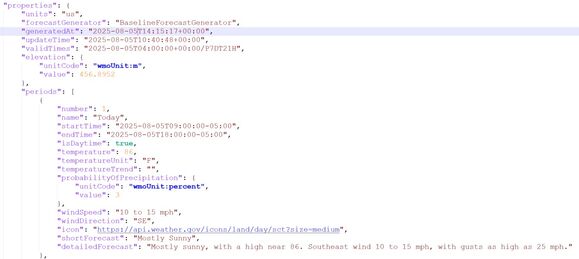
Figure 1: Returned JSON document containing weather information
The extra help we will use to interpret the JSON document returned from the web service is the IBM i built-in table function JSON_TABLE. JSON_TABLE can be used to turn the JSON document into a table that can be easily queried.
JSON_TABLE is a table function that takes JSON, evaluates that JSON, and based on what you define, returns a set of rows as a result. The first parameter for JSON_TABLE is the JSON object, in this case, the document we retrieved from the weather.gov api. The second parameter defines the JSON path. In this case, we want to drill down into the $.properties.periods path to get the daily weather information. Finally, we define the columns we are interested in returning in the table using a path to determine where in the JSON document to get the information. In this case, we are interested in extracting the day of the week and time of day and the temperature at that day and time.
In the following example, the JSON_TABLE function will call the weather.gov api and return the forecasted temperature for the next 7 days.
SELECT * FROM
JSON_TABLE(
QSYS2.HTTP_GET(
'https://api.weather.gov/gridpoints/TOP/31,80/forecast',
'{"headers":{"User-Agent":"(myweatherapp.com,
"sslCertificateStoreFile":"/home/javaTrustStore/fromJava.KDB"}'),
'lax $.properties.periods[*]'
COLUMNS(name VARCHAR(20) PATH 'lax $.name',
temperature INT PATH 'lax $.temperature'));
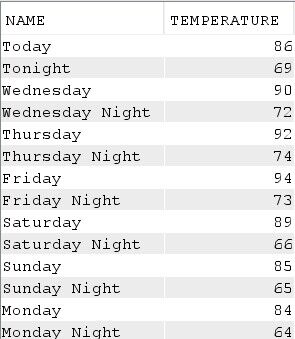
Figure 2: Table returned from JSON_TABLE query
This example shows how easy it is to use HTTP functions and JSON_TABLE to retrieve information from a web service and integrate it into your applications using SQL. For more information about HTTP services, see https://www.ibm.com/docs/en/i/7.6.0?topic=programming-http-functions-overview. For more information about JSON, see https://www.ibm.com/docs/en/i/7.6.0?topic=programming-working-json-data.

 Business users want new applications now. Market and regulatory pressures require faster application updates and delivery into production. Your IBM i developers may be approaching retirement, and you see no sure way to fill their positions with experienced developers. In addition, you may be caught between maintaining your existing applications and the uncertainty of moving to something new.
 IT managers hoping to find new IBM i talent are discovering that the pool of experienced RPG programmers and operators or administrators with intimate knowledge of the operating system and the applications that run on it is small. This begs the question: How will you manage the platform that supports such a big part of your business? This guide offers strategies and software suggestions to help you plan IT staffing and resources and smooth the transition after your AS/400 talent retires. Read on to learn:
LATEST COMMENTS
MC Press Online