









Learn how to use data change table references with your SQL Data Manipulation Language (DML) statements to have instant programmatic access to old, new, and final data values for the rows affected by INSERT, UPDATE, and DELETE statements.
Your applications run millions of daily INSERT, UPDATE, and DELETE data change statements. However, sometimes your applications may need to do more than just run the data change statement. You may also want to see the results of your INSERT, UPDATE, or DELETE to better understand how your data is changing or to do additional processing based on how your data was modified. To do this, you can use a data-change table reference to embed a SQL INSERT, UPDATE, or DELETE statement in the FROM clause of a SELECT statement. The SELECT statement will then return the rows that were modified by the data change statement.
Before IBM i 7.6, support existed for a data-change table reference to use an INSERT statement. In IBM i 7.6, additional support was added for both UPDATE and DELETE statements. Let’s first look at the existing support in IBM i 7.5 and IBM i 7.4, then at the new one in IBM i 7.6.
First, let's create a sample schema to get some existing data to work with.
CALL qsys.create_sql_sample('MYLIB');
SET SCHEMA MYLIB;
SET PATH MYLIB;
Now, let’s insert a row into the EMPLOYEE table. Usually, when I insert a row, I see something like this.
INSERT INTO EMPLOYEE
VALUES ('300001','JOHN','J','GREEN','D11','1234',CURRENT DATE,
'DESIGNER',16,'M',DATE('1990-05-10'),60000,NULL,NULL);

I can see that one row was inserted into my table. However, if I change my statement so that the INSERT is embedded in a SELECT statement, my row will be inserted, and a table will be returned with a row for each row inserted. The table reference in the SELECT statement will use the FINAL TABLE syntax to do this. This will return an intermediate result table containing the inserted rows.
SELECT * FROM FINAL TABLE (
INSERT INTO EMPLOYEE
VALUES ('300001','JOHN','J','GREEN','D11','1234',
CURRENT DATE,'DESIGNER',16,'M',
DATE('1990-05-10'),60000,NULL,NULL)
);

We are using a generated value to set the CURRENT DATE. If we look at the results table, we can see that the generated value for the current date is ‘2025-04-25’. FINAL TABLE can be a useful tool when working with generated values. For example, your application may need to know the value generated for an identity column. FINAL TABLE can be used to return the identity value generated when the INSERT statement is executed.
Because this is a SELECT statement, we can modify our query to return only the information we are interested in. For example, I can choose which columns I want to return on the SELECT and use a WHERE clause to only return the rows I am interested in. The following example inserts three rows, but only returns two rows because there is a WHERE clause to only return employees in WORKDEPT D11. The WHERE clause on the SELECT statement does not affect the rows inserted into the table. All three rows are still inserted, even though only two are returned in the intermediate results table.
SELECT EMPNO,FIRSTNME,LASTNAME,WORKDEPT FROM FINAL TABLE (
INSERT INTO EMPLOYEE
(EMPNO,FIRSTNME,MIDINIT,LASTNAME,WORKDEPT,PHONENO,
HIREDATE,JOB,EDLEVEL,SEX)
VALUES
('300002','JANE','A','SMITH','B01','5432',CURRENT DATE,
'MANAGER',18,'F'),
('300003','NATE','C','JONES','D11','9876',CURRENT DATE,
'ANALYST',17,'M'),
('300004','STEVEN','E','COOPER','D11','1928',CURRENT DATE,
'ANALYST','16','M')
)
WHERE WORKDEPT = 'D11'
ORDER BY LASTNAME ASC;
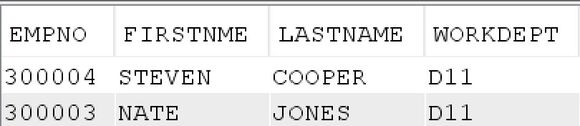
New support for UPDATE and DELETE SQL statements
In the newly released IBM i 7.6, support has been added for embedding the UPDATE and DELETE statements into a query.
Up to this point, we have only used the FINAL TABLE syntax, but there also exist two additional FROM clause qualifiers you can use: OLD TABLE and NEW TABLE. It is essential to understand the difference between the three:
- OLD TABLE
The data returned are the values of the rows before any BEFORE triggers are executed. This clause can be used with UPDATE and DELETE statements. - NEW TABLE
The data returned are the values of the rows after the data change statement is completed, but before referential integrity constraint evaluation is complete, or AFTER triggers are executed. This clause can be used with UPDATE and INSERT statements. - FINAL TABLE
The data returned is the same as NEW TABLE, but in addition, it guarantees that no AFTER trigger or RI constraints will cause the data to be changed. Like NEW TABLE, this clause can be used with UPDATE and INSERT statements.
Let’s look at an example. In this example, we will delete all sales from the SALES table before January 1st, 1996. We will embed the DELETE statement in a SELECT statement and use the OLD TABLE syntax to return the intermediate results table that contains the rows from the SALES table that were deleted.
SELECT * FROM OLD TABLE (
DELETE FROM SALES WHERE SALES_DATE < DATE('1996-01-01')
);
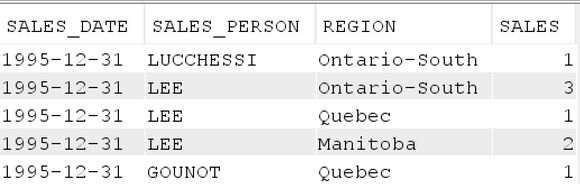
We can see the five rows that were deleted from the table.
We can also use the OLD TABLE clause to see the data's value before an UPDATE statement updates rows. Let’s look at an example where a SALES_PERSON name is being changed from LUCCHESSI to SMITH.
SELECT * FROM OLD TABLE (
UPDATE SALES
SET SALES_PERSON = 'SMITH'
WHERE SALES_PERSON = 'LUCCHESSI');
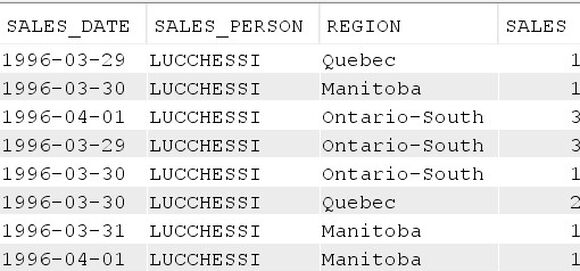
Notice that the SALES_PERSON name is still ‘LUCCHESSI’. If I then change the query to use FINAL TABLE, I will see the rows' values after the data change statement is completed.
SELECT * FROM FINAL TABLE (
UPDATE SALES
SET SALES_PERSON = 'SMITH'
WHERE SALES_PERSON = 'LUCCHESSI');
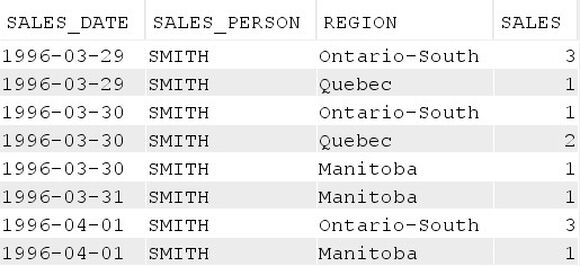
Now we can see that the SALES_PERSON name has been changed to ‘SMITH’
Using INCLUDE columns to audit values
You may want to see both the original value and the final value of a column that is changing. To do that, you can use INCLUDE columns. An INCLUDE column allows you to specify a column that is included in the intermediate result table in addition to the columns that already exist in the table. In the following example, we use FINAL TABLE to see the final results after the BONUS value of an employee is increased, but we also want to see the original value of the BONUS column. To do that, we will INCLUDE a column called BONUS_OLD_VALUE and set that value to the current BONUS value before setting the BONUS value to the increased value.
SELECT EMPNO, LASTNAME, BONUS_OLD_VALUE, BONUS
FROM FINAL TABLE (
UPDATE EMPLOYEE
INCLUDE (BONUS_OLD_VALUE DEC(9,2))
SET BONUS_OLD_VALUE = BONUS,
BONUS = BONUS * 1.06
)
WHERE EMPNO = '000020';

Using the OLD TABLE, NEW TABLE, and FINAL TABLE, combined with your INSERT, UPDATE, and DELETE statements, gives you additional tools to better understand what is happening to your data and provides additional audit capabilities. For further information about the IBM i 7.6 enhancement, see https://www.ibm.com/support/pages/node/7229557. This enhancement was provided in the IBM i 7.6 base release.

 Business users want new applications now. Market and regulatory pressures require faster application updates and delivery into production. Your IBM i developers may be approaching retirement, and you see no sure way to fill their positions with experienced developers. In addition, you may be caught between maintaining your existing applications and the uncertainty of moving to something new.
 IT managers hoping to find new IBM i talent are discovering that the pool of experienced RPG programmers and operators or administrators with intimate knowledge of the operating system and the applications that run on it is small. This begs the question: How will you manage the platform that supports such a big part of your business? This guide offers strategies and software suggestions to help you plan IT staffing and resources and smooth the transition after your AS/400 talent retires. Read on to learn:
LATEST COMMENTS
MC Press Online