









Time to get down and get dirty with a very simple application of the MVC/MVP design pattern. Read Part 1 and Part 2 of this series.
By David Shirey
Editor's Note: This article is excerpted from chapter 25 of 21st Century RPG: /Free, ILE, and MVC, by David Shirey.
This is an application that I did for one of my clients. It was designed to accept inventory into a consignment warehouse without going through all the freakiness of normal receiving. Prior to this, my client had been doing it in receiving and then backing out the GL transactions. You can imagine how excited they were when I gave them this app. Yeah, as I remember it, they didn’t start using it for four months. Some people just love backing out GL entries. I don’t work with them anymore.
I did it for them as a single program. I know, I know. But it was a while ago. It only had one screen that you enter data on, and no subfiles. So it makes a pretty simple example.
On the following pages, I have broken up the original app into three programs: a control module that controls the whole thing, a view module that displays the screen, and a single model module that checks the value of the vendor number entered to ensure it is valid.
The original app had about a dozen data elements on the screen, including warehouse, location, quantity, a couple of really weird control flags, and other stuff. For this example, I have stripped it down to just one field, a product number. I want to keep things as simple as possible.
Anyway, here it is. Ready?
Data and Display Files
Before we get started doing our MVC programs, we have a couple of things to do.
Data File
First, you will need to create a file that we can use in the model program to verify the product number against. In my model program, I am calling this file MSPMP100. This is just a product master type file. You can call yours anything you want, just be sure to mentally convert my MSPMP100 to your filename when you are reading this chapter. Or else use MSPMP100 for your file. I don’t really care.
This should be a normal, old keyed file with only one field, the product number. I will be using a field called PRDNO, 10-digit, alphanumeric, with no special attributes. PRDNO will be the key for this file.
I would create this file in the library where the MVC programs are going to be, but that is up to you. Doing it this way just keeps the library list simple.
Display File: DWS0260FM
The second thing you need to create is the display file that will be used by the view program.
This will be a simple screen, with only one field on it—you guessed it, the PRDNO field, which will be 10 digits, input capable.
Oh, you will also need a MSG field somewhere on the screen to display any returned messages. I am making this 70 digits and alphanumeric, but I guess that is up to you.
I am calling this DWS0260FM, but again, you can name it anything you want as long as you can do the mental translation.
Create these two modules first, as we will refer to them within the programs below. These simple tasks will get your hands dirty and make it easier for you to dig into what’s to come.
Model
To a great extent, it doesn’t matter where we start here. So we will go in alphabetical order: M, then V, then C.
The purpose of the “model” is to handle database interactions and other business logic foolishness. This is where the work is done, so we would expect to find relatively small, concentrated modules like the one below.
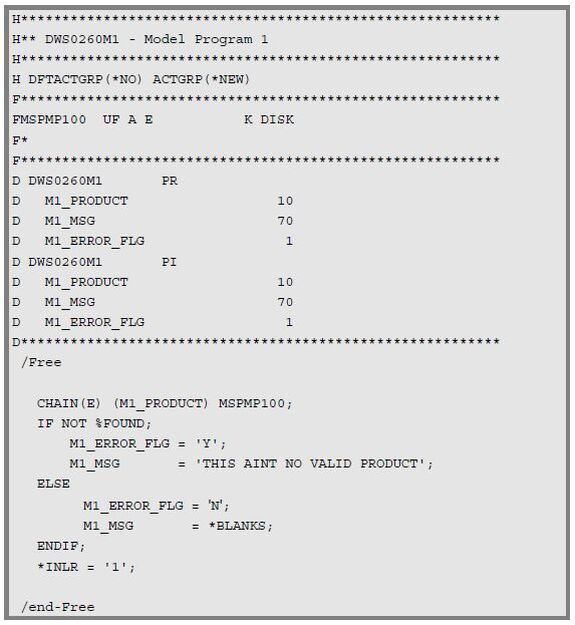
Now, as is our custom, let’s take this thing apart so we are sure we understand it. As before, we will show the snippet and then under that the description.
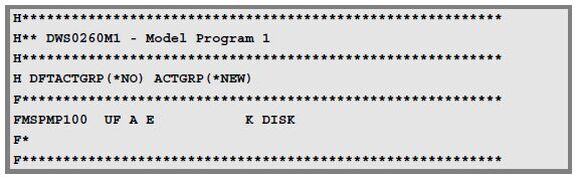
First, the H- and F-specs. We have the H-spec if you need that to make your program ILE, then a rather pedestrian F-spec for the one file we will be using in this model. Nothing special here, folks, so let’s move along. And I am using an F-spec for those people who are not able to do the /Free control statements. But if you can use them, then feel free to do so.
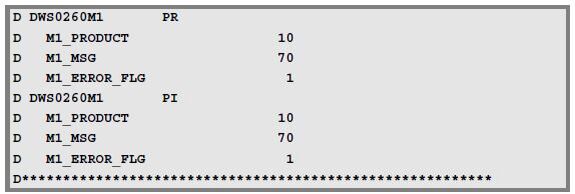
Next, come the D-specs. Remember what the model is: it’s a program that is called from the control module, and so, being the “called,” program, it has both a PR (prototype) and a PI (program interface) D-spec. This consists of three parameters: a 10-character alphanumeric product number, and then a message field, and an error flag that is set to Y if an error is found.
Because the M1_PRODUCT field value comes from the view display file, I could have passed the entire display record over instead of just one field. This would have made the models look more standardized but would have also increased the size of the parms being passed. In addition, if we had decided later that we needed another parm from the screen to do the editing on the PRODUCT, then it would have been there and we wouldn’t have needed to add another parm to the prototype. At the same time, however, that sort of violates our one module-one logical idea model, and I am not sure I like that. You make the call. Either way you go, if you add another field to be edited here you are still going to have to change the program to add in that logic. Just passing the entire display record in dioes not eliminate the need for a modification here.
The model is called from the control program, and we will see that in due time.
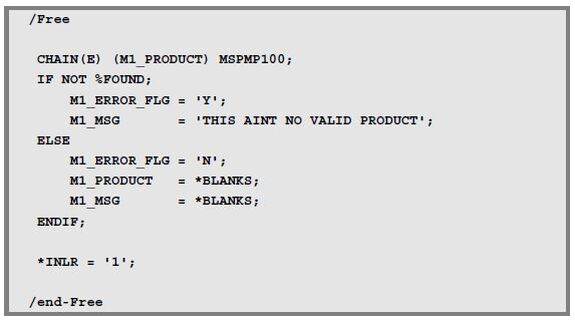
Finally, the logic. It’s fairly straightforward. We use the product number that came in through the PI data structure and read the MSPMP100 file. Then if the record is not found, we set a message value and send this information back to the control program. If we find it, then we just return to the calling program, no message required. In all of this, I am not bothering to set the cursor position. This would be unnecessary code that would glop everything else up. Besides, the screen only has one field, but normally you would want to set the cursor position.
View
The next module we want to look at is the view. It’s a little longer, but that isn’t a big deal.
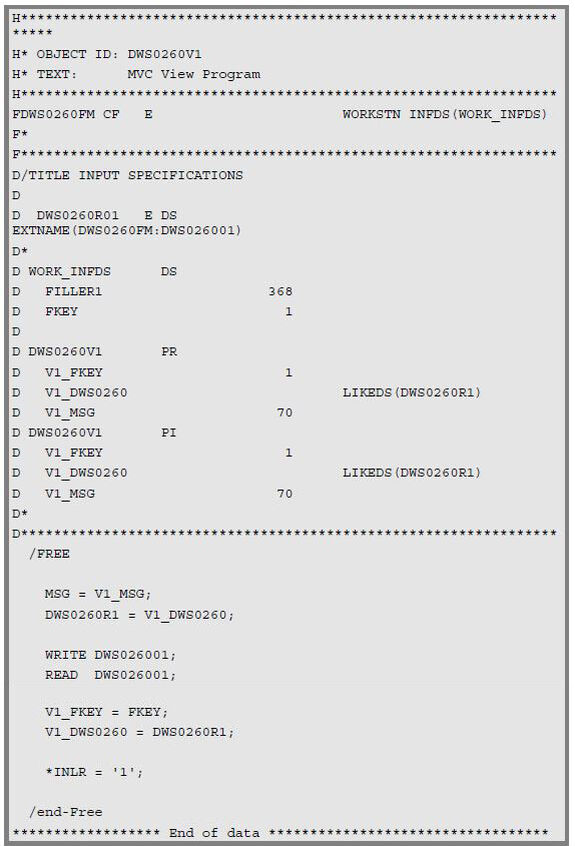
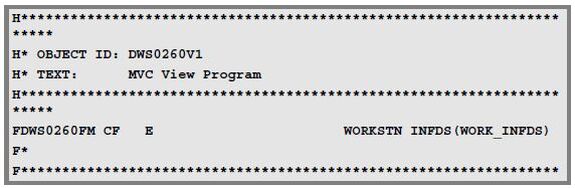
First, we have the F-specs, but the only file here is the workstation file for the DDS display that we are supporting.
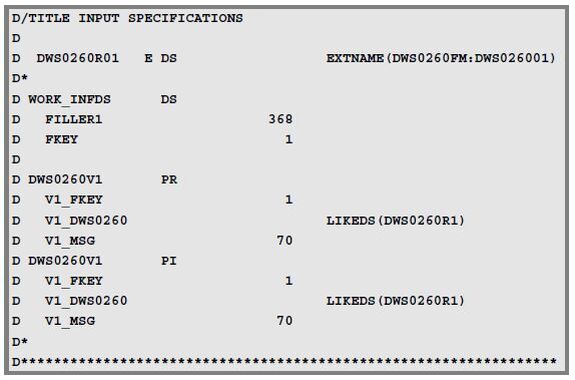
Then the D-specs. Since the view module is called from the control module, you will immediately recognize the prototype (PR) and program interface (PI) structures. The only thing that is different here is the V1_DWS0260 parm, which is actually the layout of the display file (because we need to pass the screen data back and forth to and from the various modules).
You cannot define a DS within a PR or PI (it assumes everything is a standalone field), so we need to attach the LIKEDS keyword and refer to a separate data structure, the DWS0260R01.
And, to avoid having to list all the display fields under the DWS0260R01 data structure, I am using the EXTNAME keyword to specify a filename (DWS0260FM) and a record format within that file (DWS026001).
It seems complicated when you first look at it, especially the introduction of the DWS0260R01, but once you think about it for a couple of weeks it doesn’t seem so bad (actually you just lose interest and give up, but what the hey).
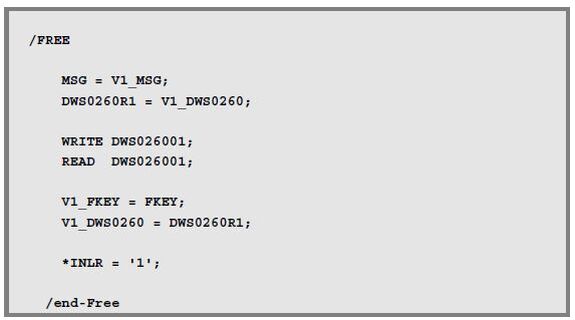
Finally, the logic itself. And, again, it is pretty simple.
First, I set the fields in the DWS026001 workstation record from the values passed in via the prototype.
You might think at this point, “wouldn’t the MSG field be covered by this— after all it is in the workstation record?” And the answer is, no, I don’t think so. The workstation record is kind of weird, having both an input and output format (designated by a system-defined I- and O-spec). The MSG field is part of the O-spec but not the I-spec (because you don’t make this an input- capable field), and the one that seems to be picked up and passed is the input format. Hence, MSG is not part of that and needs to be addressed separately.
Then we do the write and read combo to display the appropriate results on screen. Mostly we are interested in the MSG field in case there are any errors and the appropriate fields on the screen if they need correction.
Finally, I get the function key that was used on the read and put it in the prototype data structures for return to the control program, along with any data that has been entered on the screen.
Controller
The last step is to look at the control module. This is what will actually be called when you want to access this function. It contains calls to the model and view programs that are required to make this all work.
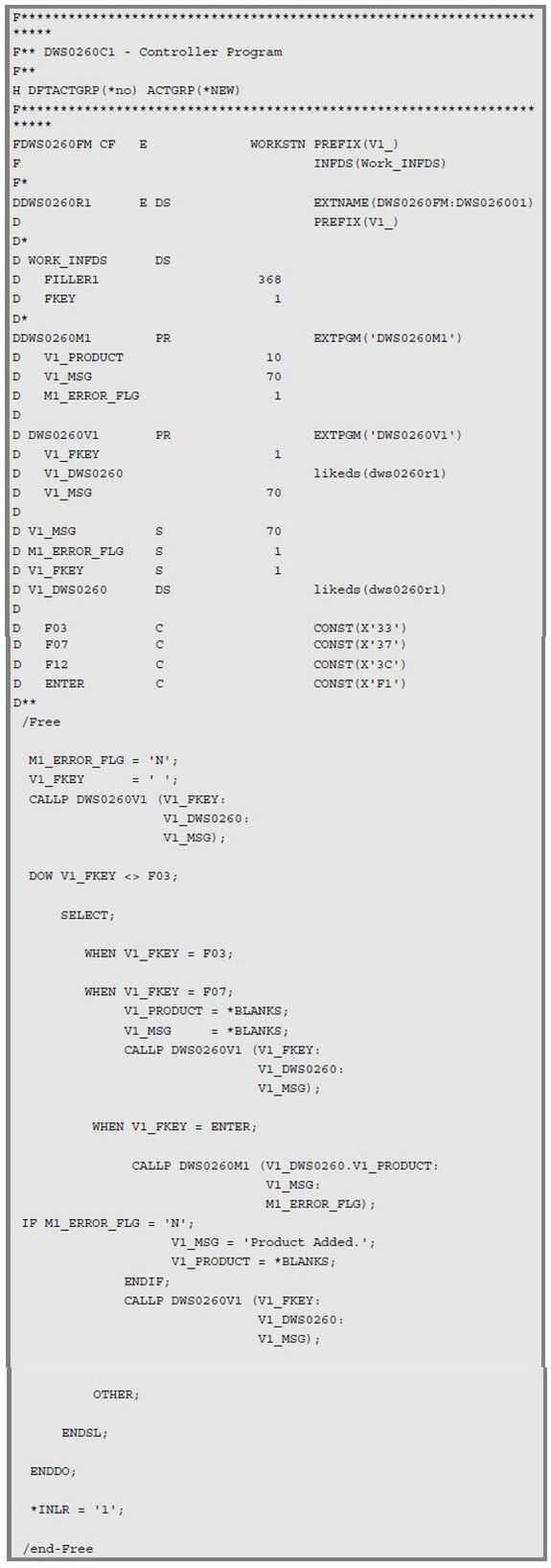
Now, let’s rip that baby apart.
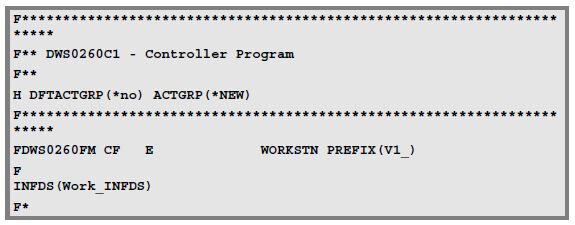
Nothing major here, just the display file.
Oh, yeah, the display file. But we have the view module to handle the displays, and the reason for this whole thing is to separate display from logic from data manipulation. So, why is the display file here in the control module? You might have expected there to be nothing in the F-specs for this program.
We will get to why it is there in a moment.
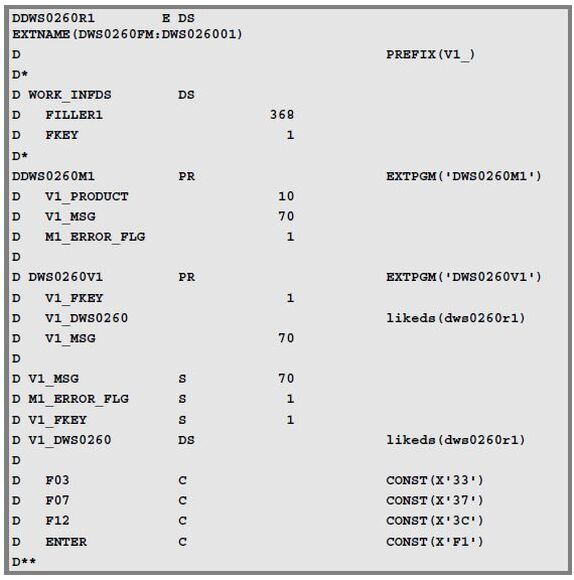
The first thing we run into is a data structure for the workstation record.
And that is followed closely by the INFDS structure that we will use to determine what function key has been used.
Then we have the prototype for the model module. We have named this program DWS0260M1. If we had another model that we were calling, we could call that DWS0260M2 and include a PR for that. Below the PR are the actual definitions for the M1 parms because the PR D-spec does not really define those fields to the program. And do you remember the reason for that? That’s right: because.
This is followed by the prototype for the view module, DWS0260V1.
We then define the fields from both of the prototypes that are required. (Remember, the PR does not really define the fields, so if they are not in an F-spec or another D-spec, they need to be defined.)
Finally, we have the constants that we are using in the SELECT statement to review against the function key used in the read.
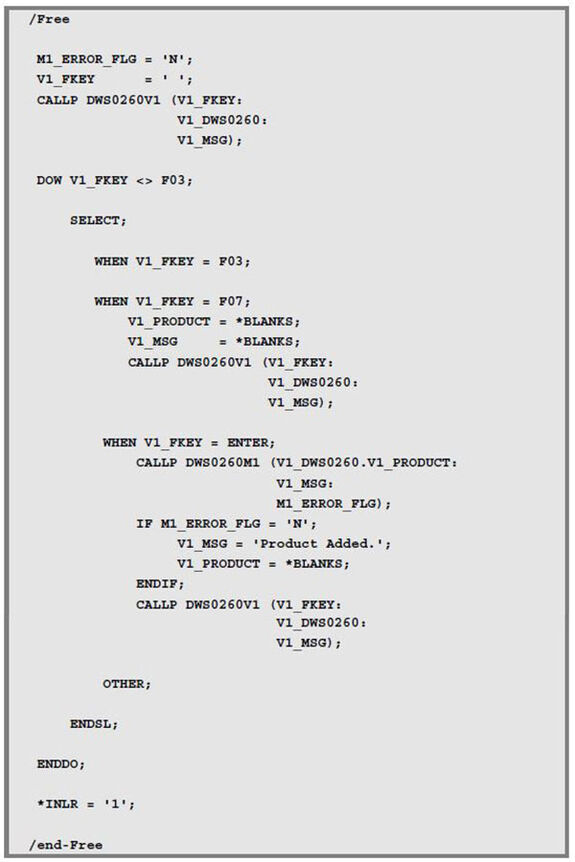
We are now ready for the logic per se.
Start by doing a couple of basic initializations (V1_Error_Flag and V1_MSG), then call the view program to display the initial screen. Then check the value of the FKEY to see what function key was used.
If it is F3, then we exit the SELECT.
If it is F12, then we initialize the screen values and call the view program to clean off the screen.
The only other option I am using here is the Enter key. If that is selected, then that is the branch that processes the data entered on the screen. Since there is only one field on the screen, this is rather limited in what it does.
First, it calls the DWS0260M1 model program that will validate the product number.
Upon return from that program, we check the value of the error flag. If it is N, that is, the product number is OK, then I set the message to indicate that the record has been added. It hasn’t of course, as we do not do a write anywhere in this example, but we will come to that later.
Then we call the view program, DWS0260V1, to redisplay the screen.
And that’s it. Pretty simple, really.
What Ya Shoulda Learned
It’s pretty obvious, actually.
Granted, this is very simple, but simple is a good place to start, and this is a very simple example of an MVC program.
The essence of MVC is to keep ’em separated. Separate the display logic from the business rules from the control structure. Nowhere is this separation more pronounced than with the data. Take a look at the structure. Everything has been done to reduce data coupling as much as possible. For example, the application file appears only in the model program. Even the decision to pass in only the field value being modified, rather than the whole display data structure, helps to insulate this program from changes to the app. If you decide to add a field later and need to enter and edit the vendor classification, it will not affect the model that handles the product master information.
In a perfect world, the one that I dream will exist when the Overlords return, we would limit the display data structure to the view program. Unfortunately, that is not the way our world works now, and something has to tie the various pieces of this application together.
Want to learn more? You can pick up Dave Shirey's book, 21st Century RPG: /Free, ILE, and MVC, at the MC Press Bookstore Today!

David Shirey is president of Shirey Consulting Services, providing technical and business consulting services for the IBM i world. Among the services provided are IBM i technical support, including application design and programming services, ERP installation and support, and EDI setup and maintenance. With experience in a wide range of industries (food and beverage to electronics to hard manufacturing to drugs--the legal kind--to medical devices to fulfillment houses) and a wide range of business sizes served (from very large, like Fresh Express, to much smaller, like Labconco), SCS has the knowledge and experience to assist with your technical or business issues. You may contact Dave by email at
MC Press books written by David Shirey available now on the MC Press Bookstore.
 |
||
 |
|
21st Century RPG: /Free, ILE, and MVC Boost your productivity, modernize your applications, and upgrade your skills with these powerful coding methods. List Price $69.95 Now On Sale
|

 Business users want new applications now. Market and regulatory pressures require faster application updates and delivery into production. Your IBM i developers may be approaching retirement, and you see no sure way to fill their positions with experienced developers. In addition, you may be caught between maintaining your existing applications and the uncertainty of moving to something new.
 IT managers hoping to find new IBM i talent are discovering that the pool of experienced RPG programmers and operators or administrators with intimate knowledge of the operating system and the applications that run on it is small. This begs the question: How will you manage the platform that supports such a big part of your business? This guide offers strategies and software suggestions to help you plan IT staffing and resources and smooth the transition after your AS/400 talent retires. Read on to learn:
LATEST COMMENTS
MC Press Online