









Git is a powerful tool that more and more IBM i shops are embracing. Within the past five years, the platform has seen the use of Git-managed source code nearly double (Fortra’s IBM i Marketplace Study).
By Anna Marrah, Midrange Dynamics
It’s easy to understand this growing trend. Git allows shops to manage all source code, including IBM i native source (like RPG), alongside other languages like Java, PHP, or Node.js, within a single repository. This simplifies source code management and makes coordination across different IT teams much easier.
However, as Git is adopted across the platform, there is some confusion surrounding source management and change management. The two tools are often seen as the same thing or as interchangeable. However, they are not equivalent, and it is essential to understand the differences and to utilize both of these management tools to optimize your IBM i environment fully.
Source Management VS. Change Management
Source management, also known as version control, is all about tracking, storing, and organizing code and other digital assets. By allowing multiple developers to work on the same codebase without overwriting each other’s work, it plays an invaluable role in team collaboration.
A typical source management tool, such as Git, will provide the ability to create branches for new features, merge code back into the main branch, tag releases, resolve merge conflicts, and maintain a detailed history of who made what changes and when. It records every person’s work to ensure teams can collaborate, merge changes, and roll back to a previous version if necessary. This collaboration, with a detailed history, is the point of source management.
At a glance…
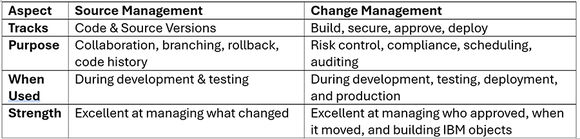
Change management has some similarities, but a very different purpose. A change management solution manages IT changes through a structured process. It guides developers through the planning, development, build, security, approvals, and implementation of those changes in a controlled way. The goal of change management is to significantly reduce risk, minimize business disruption, and ensure that valuable changes can be implemented to promote business stability and growth.
A typical change management tool will provide the ability to handle source, buildobjects, object promotion, and object authority, provide audit trails for SOX, PCI, or HIPAA, enforce approvals before deployment, schedule deployments to avoid downtime, and automate rollbacks if there is a problem with deployment. It acts as a safety net, allowing updates to business applications to take place regularly with minimal risk.
Why Not Only Git on IBM i?
In different conversations, the MDNA team has heard of multiple shops trying to utilize Git as though it were a change management solution. There are some gaps between source management and change management that make this use of Git less than ideal.
Object vs. Source
The IBM i compiles source into objects. Having source residing only in Git does not guarantee you know what is deployed; it is critical to control and document the build and binding process that produces the objects. After the objects exist, they must be secured appropriately. Build history complements audit tracking to document the approvals and promotion process.
Risk to Deployment
Object build and promotion rules, such as dependencies or data areas locks, as well as some IBM i-specific tools, cannot be handled by pure Git workflows.
Regulatory Requirements
CAB testing and approval logs separate from Git commit histories are required in some IBM i shops, making change management mandatory for successful compliance.
Slow Performance
Git can be lightning-fast when dealing with just a few hundred items in a repository. However, IBM i applications with substantial code often contain tens of thousands of items, which can cause Git transactions to slow to a crawl.
Different But Complementary
Because source management and change management serve different but complementary purposes, it is considered important in most modern IBM i environments to have a tool for each. There are some significant benefits of doing this.
Modern Development Practices
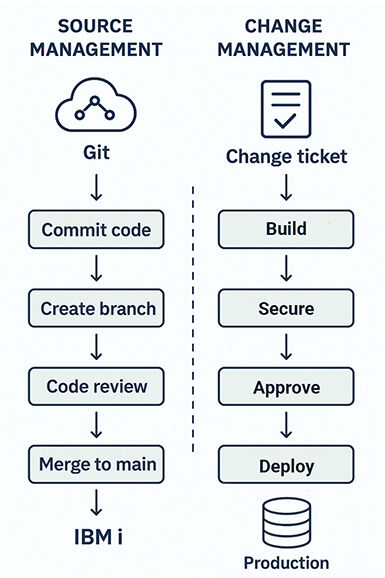
Using Git, developers can use branching and peer reviews while also participating in a CI/CD pipeline.
Full Traceability
You can see exactly which Git commit was deployed, when it was deployed, and who approved it.
Compliance & Auditing
Effective change management goes a step beyond the Git logs and creates a customizable audit report to help meet compliance requirements.
Fewer Mistakes
The branching of Git helps protect code development, while the promotion rules introduced through change management reduce the risk of deploying untested code or incorrectly bound/secured objects.
Consistency Across Platforms
Not many shops today utilize only one platform. It is extremely helpful if the IBM i can participate in a hybrid environment with Java, .NET, or Node.js components.
These benefits can be a huge game-changer for IBM i shops. With the reasons to utilize Git in tandem with a good change management tool established, it’s essential to have a fully functional, modern change management tool specifically built for the IBM i. Legacy products will not optimize your Git workflows to the fullest extent possible and may often fall short of what you need them to accomplish. Here are some key functions to look for in a solid change management product:
- Integration capabilities
- SQL & IFS object handling
- Cross-referencing down to the field level
- External tool interfaces/APIs
- Modern IDE integration
- Pre-install checks, conflict detection, and rollback automation
- Granular security and compliance
- Detailed, customizable reporting
You will want a change management tool with this kind of functionality if you are going to truly optimize Git on IBM i.
Match Made In Heaven - The MDChange Advantage
MDChange is an excellent example of a modern change management tool from Midrange Dynamics. Git workflow in MDChange is specifically designed for IBM i, optimizing repository management, testing, and deployments for greater productivity, flexibility, and scalability. MDChange supercharges performance for GitHub, GitLab, Bitbucket, and Azure Repos, resulting in significant productivity gains.
Maximize Git Efficiency for Large IBM i Applications
Git can be incredibly quick when dealing with just a few hundred items in a repository. But when dealing with tens of thousands of items — common for IBM i applications with substantial source code — transaction wait times during a new branch build can take minutes.
MDChange enables shops to work efficiently with large repositories or break them into smaller, more manageable ones. Either way, cloning is fast, and the Git experience becomes seamless and highly responsive.
When maintaining a single large Git repository, MDChange automatically creates multiple clones directly on the IBM i system, utilizing load balancing across several service jobs to ensure transaction wait times are minimal. This is true even for concurrent development on multiple branches.
Orchestrate Development Across Multiple Git Repos
If working with smaller Git repositories, MDChange orchestrates branch creation, handles merge requests, and manages dependencies across these repositories. This ensures that your target environment receives the necessary artifacts in the proper order. And once again, load balancing is employed to align processes across multiple service jobs for fast, efficient handling of Git repos.
Git excels for concurrent development, but agile development isn’t complete without the ability to test concurrently. While development cycles can span only a few days, testing can drag on for weeks.
That’s where MDChange takes things to the next level. When a feature branch is published automatically by MDChange or another process, MDChange instantly creates branch-based libraries and IFS folders using customized naming patterns. It populates test environments, manages data, and continuously compiles changes, including dependencies that reside outside Git.
If issues arise, developers can modify the code directly on the IBM i. MDChange then tracks these changes and syncs them back to the repository, ensuring that everything stays up to date.
Seamless Retention of Custom Scripts and Objects
As a project evolves, retaining custom commands, scripts, and non-Git-based objects across environments becomes increasingly vital.
For example, when merging a feature branch into an integration branch, MDChange ensures that all custom objects and definitions from lower environments are automatically included in the deployment set for the target environment. It’s a seamless transition that keeps everything working harmoniously.
Simplified, Granular Deployments to Production
Whether the deployment set comes from a merge of several branches or a single feature branch, MDChange makes it easy to execute granular deployments to production or split out specific sets based on features or other criteria. These deployment sets can be sent to various test or production partitions at designated times — giving teams flexibility for targeted, time-sensitive deployments.
Flexible Repository Management
Whether work is done with large repositories or they are broken into smaller ones, MDChange offers maximum efficiency.
Automatic Load Balancing
MDChange uses load balancing across service jobs to minimize transaction wait times, even during high-volume development with multiple branches.
Concurrent Testing Made Easy
Automate branch-based libraries, IFS folder creation, data population, and continuous compilation, for fast concurrent testing—no matter the complexity.
Custom Object Retention Across Environments
Automatically track and deploy custom scripts, commands, and non-source objects as developers move between development, integration, and production environments.
Granular, Flexible Deployments
Easily split deployment sets by features or other criteria, enabling targeted, time-sensitive deployments to multiple test or production partitions.
Database Management
MDChange handles changes to database files, identifies files and object dependencies, makes sure the data is repopulated correctly, rebuilds access paths, reestablishes journaling, and manages triggers. With MDRapid, you can minimize downtime and minimize the risk, making it possible to make changes to large files quickly and easily.
Harnessing IBM i’s Power Through Source and Change Management Tools
By combining the complementary strengths of Git for source management with an IBM i-specific change management solution like MDChange, organizations can achieve the best of both worlds: fast, collaborative development and safe, controlled deployments. This dual approach enables teams to embrace DevOps practices, maintain full compliance, and keep development and production environments in sync without sacrificing performance or reliability. In today’s fast-paced environment, this is a necessity for IBM i shops that want to stay agile, competitive, and future-ready.
 Business users want new applications now. Market and regulatory pressures require faster application updates and delivery into production. Your IBM i developers may be approaching retirement, and you see no sure way to fill their positions with experienced developers. In addition, you may be caught between maintaining your existing applications and the uncertainty of moving to something new.
 IT managers hoping to find new IBM i talent are discovering that the pool of experienced RPG programmers and operators or administrators with intimate knowledge of the operating system and the applications that run on it is small. This begs the question: How will you manage the platform that supports such a big part of your business? This guide offers strategies and software suggestions to help you plan IT staffing and resources and smooth the transition after your AS/400 talent retires. Read on to learn:
LATEST COMMENTS
MC Press Online