









Read this article to learn about IBM i network security risks and what to do about them.
If you review a typical corporate cybersecurity policy, you will most likely see a firewall listed as a mitigation method for cyber threats such as malware, ransomware, and data breaches. A well-written cybersecurity policy would also contain remediation steps when different types of threats are detected. Security measures like firewalls are commonly in place, so why do so many corporations still fall victim to cyberattacks such as ransomware?
A famous example is the fish tank cyberattack that happened a few years ago on a well-known casino. Looking into the anatomy of that attack, it was discovered that a weak IoT device was used to penetrate the network. That weak IoT device? A thermometer in a fish tank. The lesson of that attack was clear - cybercriminals will target the weakest link in your IT environment.
Don’t Let the IBM i Become Your Weakest Link
If the network traffic accessing your IBM i is left unmonitored and there are no security measures in place to control access, it could become the weakest link in your organization’s infrastructure. Although IBM i has many security capabilities, the ability to monitor and secure remote access to the IBM i, whether that access is from within your corporate network or external to it, is not readily available out of the box. The way to achieve this is to implement exit point security, a beneficial technical control to secure your IBM i network traffic.
Exit point security requires writing exit point programs to cover all the protocols available on the IBM i. (Examples: FTP, ODBC, JDBC, File Server, Telnet, Remote Command) There are also several third-party exit point solutions available on the market that have written the exit programs and various management interfaces for you if you do not want to spend the time writing your own. If you prefer to write your exit point programs, there are some examples in the IBM i documentation that can help you get started. One thing worth noting here is that you will need to write exit programs for all the remote exit points, or you will be only partially securing your server. I have seen many instances where people have written an FTP or ODBC exit program but neglected all other areas of remote access, leaving access through all other servers vulnerable.
A list of exit points for remote servers is shown below:
|
Server |
Format name(s) |
Application name |
|
QIBM_QNPS_ENTRY |
ENTR0100 |
*NETPRT |
|
QIBM_QNPS_SPLF |
SPLF0100 |
*NETPRT |
|
QIBM_QPWFS_FILE_SERV |
PWFS0100 |
*FILE |
|
QIBM_QTG_DEVINIT |
INIT0100 |
*TELNET |
|
QIBM_QTMF_CLIENT_REQ |
VLRQ0100 |
*FTP |
|
QIBM_QTMF_SERVER_REQ |
VLRQ0100 |
*FTP |
|
QIBM_QTMF_SVR_LOGON |
TCPL0100 |
*FTP |
|
QIBM_QTMF_SVR_LOGON |
TCPL0200 |
*FTP |
|
QIBM_QTMF_SVR_LOGON |
TCPL0300 |
*FTP |
|
QIBM_QTMX_SERVER_REQ |
VLRQ0100 |
*REXEC |
|
QIBM_QTMX_SVR_LOGON |
TCPL0100 |
*REXEC |
|
QIBM_QTMX_SVR_LOGON |
TCPL0300 |
*REXEC |
|
QIBM_QTOD_SERVER_REQ |
VLRQ0100 |
*TFTP |
|
QIBM_QZDA_INIT |
ZDAI0100 |
*DATABASE |
|
QIBM_QZDA_NDB1 |
ZDAD0100 |
*DATABASE |
|
QIBM_QZDA_NDB1 |
ZDAD0200 |
*DATABASE |
|
QIBM_QZDA_ROI1 |
ZDAR0100 |
*DATABASE |
|
QIBM_QZDA_ROI1 |
ZDAR0200 |
*DATABASE |
|
QIBM_QZDA_SQL1 |
ZDAQ0100 |
*DATABASE |
|
QIBM_QZDA_SQL2 |
ZDAQ0200 |
*DATABASE |
|
QIBM_QZHQ_DATA_QUEUE |
ZHQ00100 |
*DTAQ |
|
QIBM_QZRC_RMT |
CZRC0100 |
*RMTCMD |
|
QIBM_QZSC_LM |
ZSCL0100 |
*CENTRAL |
|
QIBM_QZSC_NLS |
ZSCN0100 |
*CENTRAL |
|
QIBM_QZSC_SM |
ZSCS0100 |
*CENTRAL |
|
QIBM_QZSO_SIGNONSRV |
ZSOY0100 |
*SIGNON |
Figure 1: List of remote server exit points.
How to Implement Exit Point Security
In the next section, I will discuss how to implement exit point security.
Understanding Exit Points
Exit points are a mechanism to help intercept operations before they are executed. They give you the ability to inspect the operation and make a decision as to whether the operation should be allowed or not. This has similar behavior to a firewall, but the main difference is that exit points provide the ability to inspect remote access requests at a more granular level. For example, exit programs can evaluate details such as the IFS file or QSYS.LIB object attempting to be accessed, as well as capture the exact ODBC or JDBC operation trying to be executed.
Each exit point will have several parameters available, and there will be one critical parameter that determines if the operation should be allowed or not. Depending on the exit point, you will have several input parameters to help you identify the user and the location of the person performing the remote operation.
If you review the FTP Logon exit point (QIBM_QTMF_SVR_LOGON) format TCPL0300, the parameters available are listed below.
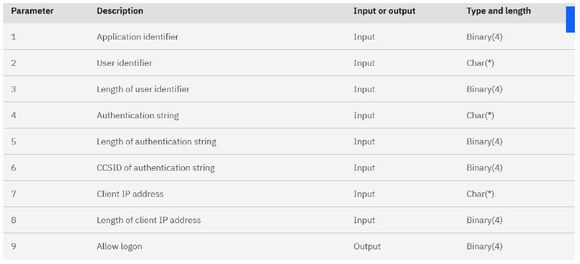
Figure 2: FTP Logon exit point (QIBM_QTMF_SVR_LOGON) format TCPL0300 parameters.(Reference: https://www.ibm.com/docs/el/i/7.4.0?topic=point-tcpl0300-exit-format)
The input parameter list (1-8) can help you identify the user, and the output parameter (9) determines if the remote operation is allowed to be performed.
Writing Exit Programs
To process the exit point parameters, you will need to write exit programs. There are several examples in the IBM i documentation.
In this example (Link to: https://www.ibm.com/docs/el/i/7.4.0?topic=fslep-example-ftp-server-logon-exit-program-in-c-code), note the section on how to set the return code to allow or block the operation:
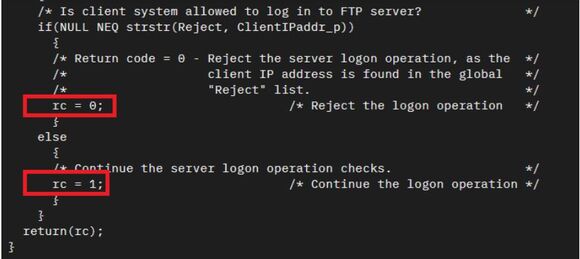
Figure 3: Section of sample FTP exit program showing the return code being set to allow or block the remote request.
Registering Exit Programs
The last but most crucial step is to register the exit programs in the IBM i registration facility. You can list all the exit points available by running the Work with Registration Information command: WRKREGINF.
To add your exit program to the exit point registry, you can use the Add Exit Program command: ADDEXITPGM. (See IBM Reference: https://www.ibm.com/docs/en/i/7.6.0?topic=ssw_ibm_i_76%2Fcl%2Faddexitpgm.html).
You will need to follow the same process for all the exit points, including the socket exit point. The parameters passed by various exit points differ. Still, one standard parameter is the Allow/Deny parameter, which will determine if permission is given to the end user to perform the remote transaction on the IBM i.
Along with the advancements of open source porting initiatives on the IBM i (which are great to keep the IBM i platform current), another layer of remote access has also emerged that you need to monitor and secure. Most applications ported to IBM i and running in the PASE environment will connect using a socket connection, which bypasses traditional exit points such as FTP, ODBC, and the File Server.

Figure 4: Socket-related exit points. (Reference: https://www.ibm.com/docs/en/i/7.3.0?topic=concepts-sockets-related-user-exit-points)
Once you have implemented your exit point solution, you must gather the data and be aware of what is happening on your system. Then have a strategy to secure the network access with rules that only allow authorized users coming from known network locations to access and perform operations on your IBM i server. It is also essential that you restrict what they can do and limit the operations they can perform based on job function. For example, a bank teller should be restricted to only performing teller-related operations when connected from a secure, known network location.
Some IT leaders claim, “I don’t have any sensitive data on the IBM i, so I don’t need to do anything.” If you look back at the fish tank example, the risk of not securing your IBM i is that it can give threat actors an area to remain undetected and harvest malware or ransomware. This can not only affect the IBM i server, but can pose a risk for all the servers and data in your corporate network.
Implementing exit point security on IBM i is essential to reduce your attack surface and protect your organization from modern cyber threats. Proactive monitoring, comprehensive coverage, and tight access controls offer not only protection but also early warning signals of intrusion attempts.
 Pauline Brazil Ayala is Senior Security Advisor at Fresche Solutions. Pauline is an IBM i security expert with over 25 years of experience in developing enterprise-level security software. Her involvement has spanned the entire spectrum of software production, from initial requirements gathering to final delivery, including sales and ensuring ongoing customer satisfaction.
 Business users want new applications now. Market and regulatory pressures require faster application updates and delivery into production. Your IBM i developers may be approaching retirement, and you see no sure way to fill their positions with experienced developers. In addition, you may be caught between maintaining your existing applications and the uncertainty of moving to something new.
 IT managers hoping to find new IBM i talent are discovering that the pool of experienced RPG programmers and operators or administrators with intimate knowledge of the operating system and the applications that run on it is small. This begs the question: How will you manage the platform that supports such a big part of your business? This guide offers strategies and software suggestions to help you plan IT staffing and resources and smooth the transition after your AS/400 talent retires. Read on to learn:
LATEST COMMENTS
MC Press Online