










Adopted authority is something that needs attention.
Editor's Note: This article is excerpted from chapter 8 of the security book, Mastering IBM i Security, by Carol Woodbury.
While it’s a great tool for providing authority via an application, it does have the potential to be abused, so review is warranted. I recommend that administrators regularly review the programs that are owned by and adopt a profile with *ALLOBJ special authority. In addition, many organizations have developed applications that adopt authority to provide users access to their applications, so they need to make sure application programs are configured correctly to provide that access. This chapter discusses both scenarios and ends with a discussion on configuring dynamic SQL statements to adopt.
Discovering Programs That Adopt a Powerful Profile
The commands Print Adopting Objects (PRTADPOBJ) and Display Program Adopt (DSPPGMADP) provide lists of programs and service programs that adopt a specific profile. PRTADPOBJ only goes to print, so I find that command to be of limited use. DSPPGMADP provides more options for output, including an outfile, but why not get the information you need all at once rather than sending it to an outfile and then running a query over it? QSYS2.PROGRAM_INFO provides the mechanism to do just that.
For example, you may want to get a list of all objects that adopt QSECOFR.
SELECT program_library,
program_name,
object_type
FROM qsys2.program_info
WHERE program_owner = ‘QSECOFR’
AND user_profile = ‘*OWNER’;
And while examining the objects that adopt QSECOFR is good, you’ll likely want to examine the objects that adopt any profile with *ALLOBJ. Note that I don’t select profiles whose group has been assigned *ALLOBJ, just profiles directly assigned *ALLOBJ. When the authority-checking algorithm checks for adopted authority, it only checks for sufficient authority of the program owner, not the program owner’s group(s).
SELECT program_owner,
program_library,
program_name,
object_type
FROM qsys2.program_info
WHERE user_profile = ‘*OWNER’
AND program_owner IN (SELECT authorization_name
FROM qsys2.user_info
WHERE SPECIAL_AUTHORITIES LIKE ‘%*ALLOBJ%’)
ORDER BY program_owner;
It’s quite possible to have vendor applications on your system that have programs that adopt QSECOFR. While you can ask your vendor to justify why they’ve configured their application that way, you really have no control over them. But what you do have control over are your own applications. So you may want to focus on programs that adopt authority that are being promoted into your own application libraries. I’ve had clients that require special review of programs that are owned by and adopt a profile with *ALLOBJ and without approval are not allowed to be promoted. To ensure this process is being followed, you can look for programs that have been created in the last week (for example) that adopt an *ALLOBJ profile and make sure there’s a corresponding promotion request/approval. What you may want to do on a weekly basis then is to look for programs promoted to your production libraries.
SELECT program_library,
program_name,
program_owner,
create_timestamp
FROM QSYS2.PROGRAM_INFO
WHERE create_timestamp > CURRENT DATE - 7 DAYS
AND program_library = ‘PROD_LIB’
AND user_profile = ‘*OWNER’
AND program_owner IN (SELECT authorization_name
FROM qsys2.user_info
WHERE SPECIAL_AUTHORITIES LIKE ‘%*ALLOBJ%’);
Application Programs
Just because a program is configured to adopt authority doesn’t mean that the program owner has to have *ALLOBJ special authority. In fact, I encourage those who are reworking their applications to provide authority via adopted authority to configure the application’s owner profile with no special authorities and especially not *ALLOBJ. Having all application objects owned by the same profile and configuring the application programs to adopt should provide sufficient authority. Therefore, you’ll want to regularly check to ensure all programs in the application library are owned correctly and configured to adopt.
SELECT program_library,
program_name,
object_type,
program_owner,
user_profile,
use_adopted_authority
FROM QSYS2.PROGRAM_INFO
WHERE program_library = ‘DXRTOOLS’
AND (user_profile <> ‘*OWNER’
OR program_owner <> ‘APP_OWNER’)
AND program_name <> ‘INITIAL’;
As you may see in this previous example, there could be exceptions to this, such as the initial program that puts up the menu and command line. I encourage organizations to not have the initial program adopt to prevent adopted authority from flowing out to the menu’s command line and to commands that should be run using the end user’s authority, not adopted authority.
In that case, the programs should be configured with the User profile attribute set to *USER (so the program doesn’t adopt) as well as the Use adopted authority parameter set to *NO (so the program doesn’t inherit the adopted authority from a previously called program). You can verify those values with this:
SELECT program_library,
program_name,
object_type,
program_owner,
user_profile,
use_adopted_authority
FROM QSYS2.PROGRAM_INFO
WHERE program_library = ‘PROD_LIB’
AND program_name = ‘INITIAL’;
Dynamic SQL
Finally, dynamic SQL is used quite frequently today, and it’s often the case that the dynamic SQL statement within the program should adopt authority just as the program it’s in adopts authority. The problem is that that doesn’t happen by default. Even when the program’s User profile attribute is set to *OWNER, the dynamic SQL doesn’t adopt. To cause it to adopt, you must set the Dynamic user profile attribute to *OWNER when the program is compiled. To discover a program’s Dynamic user profile attribute, run this for OPM programs:
SELECT program_library,
program_name,
object_type,
program_owner,
user_profile,
sql_dynamic_user_profile
FROM QSYS2.PROGRAM_INFO
WHERE program_library = ‘PROD_LIB’
AND program_type = ‘OPM’;
And use this for modules bound into ILE and service programs:
SELECT program_library,
program_name,
object_type,
bound_module_library,
bound_module,
sql_dynamic_user_profile
FROM QSYS2.BOUND_MODULE_INFO
WHERE program_library = ‘QSYS2’
AND sql_dynamic_user_profile IS NOT null;
The Dynamic user profile attribute defaults to *USER, meaning that the Dynamic SQL statement doesn’t adopt. If you want the statement to adopt, it used to be that your only opportunity to change it from *USER to *OWNER was when you compiled the program. If you didn’t set it on the compile, you were forced to recompile the program. For many reasons, organizations may not want or be able to recompile. Thanks to the team at IBM Rochester, you now have another option. The QSYS2.SWAP_DYNUSRPRF procedure takes the current Dynamic user profile setting of the program that you pass in and flips it to be the other setting.
For example, if you discovered that DYNSQL200 in PROD_LIB has the Dynamic user profile set to *USER and you need it to be *OWNER, you could run the following and the result would be that the Dynamic user profile attribute would be set to *OWNER.
CALL QSYS2.SWAP_DYNUSRPRF(‘PROD_LIB’, ‘DYNSQL200’, ‘*PGM’);
More information about this procedure can be found here:
https://www.ibm.com/docs/en/i/7.4?topic=services-swap-dynusrprf-procedure
SQL Naming Conventions and Adopted Authority
A nuisance that you may not be aware of (I wasn’t until writing this book!) is the fact that the naming convention used in your static SQL (as opposed to Dynamic SQL) determines whether the program or procedure containing the static SQL adopts. This is true whether it’s created using SQL or a CL command such as Create SQL RPG Program (CRTSQLRPG).
As shown in Figure 8.1, the User profile parameter defaults to *NAMING. A little-known fact is that if the static SQL uses SQL naming (objects are specified using the library. object naming convention), the User profile attribute of the program or procedure will be set to *OWNER, meaning that the program or procedure will adopt! If the static SQL uses the System (*SYS) naming convention, the User profile attribute will be set to *USER, meaning that the program or procedure will not adopt. When running the CRTSQLxxx commands, you can override the User profile parameter, but most people don’t.
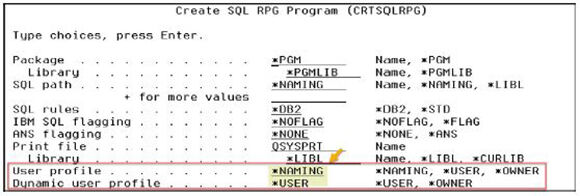
Figure 8.1: Whether the program adopts authority depends on the naming convention used by the static SQL contained in the program when using the default of *NAMING for User profile.
I hope this raises the awareness of the importance of having objects owned by the proper profiles. It should also underscore my recommendation that application-owning profiles and developers should not have *ALLOBJ special authority! I also hope that this drives home the importance of monitoring for new programs that adopt authority and that appropriate code-promotion procedures be in place and followed.
Want to learn more? You can pick up Carol Woodbury's book, Mastering IBM i Security, at the MC Press Bookstore Today!

Carol Woodbury is IBM i Security SME and Senior Advisor to Kisco Systems, a firm focused on providing IBM i security solutions. Carol has over 30 years’ experience with IBM i security, starting her career as Security Team Leader and Chief Engineering Manager for iSeries Security at IBM in Rochester, MN. Since leaving IBM, she has co-founded two companies: SkyView Partners and DXR Security. Her practical experience and her intimate knowledge of the system combine for a unique viewpoint and experience level that cannot be matched.
Carol is known worldwide as an author and award-winning speaker on security technology, specializing in IBM i security topics. She has written seven books on IBM i security, including her two current books, IBM i Security Administration and Compliance, 3rd Edition and Mastering IBM i Security, A Modern, Step-by-Step Approach. Carol has been named an IBM Champion since 2018 and holds her CISSP and CRISC security certifications.
MC Press books written by Carol Woodbury available now on the MC Press Bookstore.
 |
||
 |
|
IBM i Security Administration and Compliance: Third Edition Don't miss the newest edition by the industry’s #1 IBM i security expert. List Price $71.95 Now On Sale
|
 |
|
Mastering IBM i Security Get the must-have guide by the industry’s #1 security authority. List Price $49.95 Now On Sale
|

 Business users want new applications now. Market and regulatory pressures require faster application updates and delivery into production. Your IBM i developers may be approaching retirement, and you see no sure way to fill their positions with experienced developers. In addition, you may be caught between maintaining your existing applications and the uncertainty of moving to something new.
 IT managers hoping to find new IBM i talent are discovering that the pool of experienced RPG programmers and operators or administrators with intimate knowledge of the operating system and the applications that run on it is small. This begs the question: How will you manage the platform that supports such a big part of your business? This guide offers strategies and software suggestions to help you plan IT staffing and resources and smooth the transition after your AS/400 talent retires. Read on to learn:
LATEST COMMENTS
MC Press Online