









Is your data warehouse out of date again, or did a Windows job run late?
I'm convinced that sometimes the only reason a Windows or UNIX server is alongside an IBM i server is for better data reporting or a data warehouse.
For example, at your site, a process periodically sends data from the IBM i server to the other server. Usually, the IBM i process that builds the data starts at 7:00 p.m. and the Windows process grabs the data at 8:00 p.m. Over the years, you've never had a problem because the IBM i process started one hour before the Windows process. But your business has grown and so has your data processing. The result is that the IBM i process runs longer each day.
In fact, twice during the last month, the IBM i process finished at 8:02 p.m., two minutes late. As a result, the Windows process grabbed data before it was updated. The first time was not a big deal because it happened on a holiday, a light workday. The second time, however, it happened on a Thursday. The next day, the sales team was meeting with the CEO to discuss the push for fourth quarter sales. The CEO's business reports were supposed to include Thursday's business. But when the Director of Sales reviewed their sales?to?date presentation, they realized they didn't have any sales data for Thursday.
By the end of the meeting, everyone realized that Thursday's business was missing. Don't let this be you! Automating processes across different operating systems and servers is easy and reliable with Robot/SCHEDULE Enterprise.
Coordinate Processes
Robot/SCHEDULE Enterprise can execute IBM i commands on the server and launch a script on the other platforms. Using our example, Robot/SCHEDULE Enterprise could execute a FTP process to send data to another platform, check for its arrival, and react to the data arriving (or not arriving).
Robot/SCHEDULE Enterprise can monitor service-level agreements (SLAs) to ensure your deadlines are met. For example, when a process ends on the IBM i server, it can execute the process on the Windows server. Robot/SCHEDULE Enterprise Agents run on the UNIX, Linux, or Windows server to make sure the process completes. Figure 1 shows Robot/SCHEDULE Enterprise calling a UNIX script and monitoring for a return code. The script runs via an event-driven process when the IBM i process completes; this is called reactive job processing.
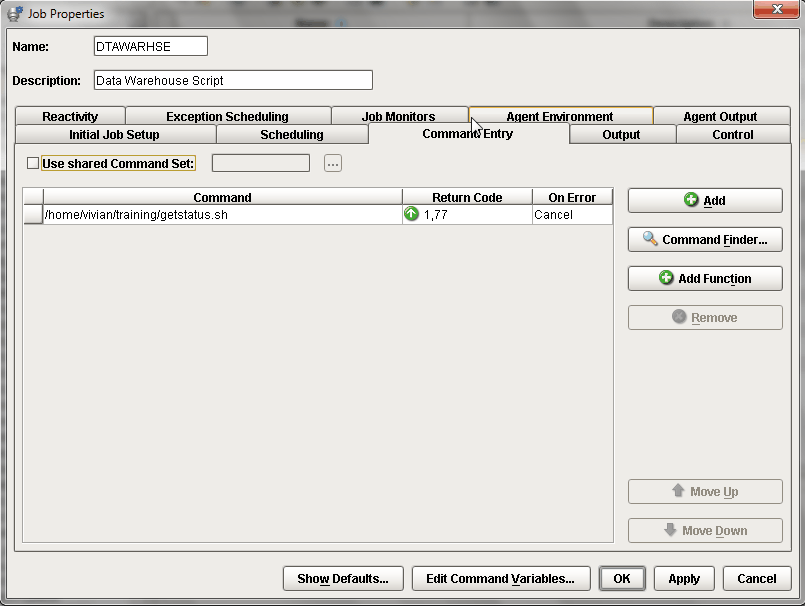
Figure 1: Robot/SCHEDULE Enterprise calls a UNIX script. (Click images to enlarge.)
Service-Level Agreements
Can you avoid the embarrassment with the CEO? Absolutely. All you need to do is set up Robot/SCHEDULE Job Monitors. They verify whether a process finishes on time, starts late, or runs too quickly. Robot/SCHEDULE can notify you if these criteria aren't met.
The job monitor panel (see Figure 2) and reporting is available for any Robot/SCHEDULE job, including UNIX, Linux, Windows, and IBM i jobs. It makes monitoring jobs easy.
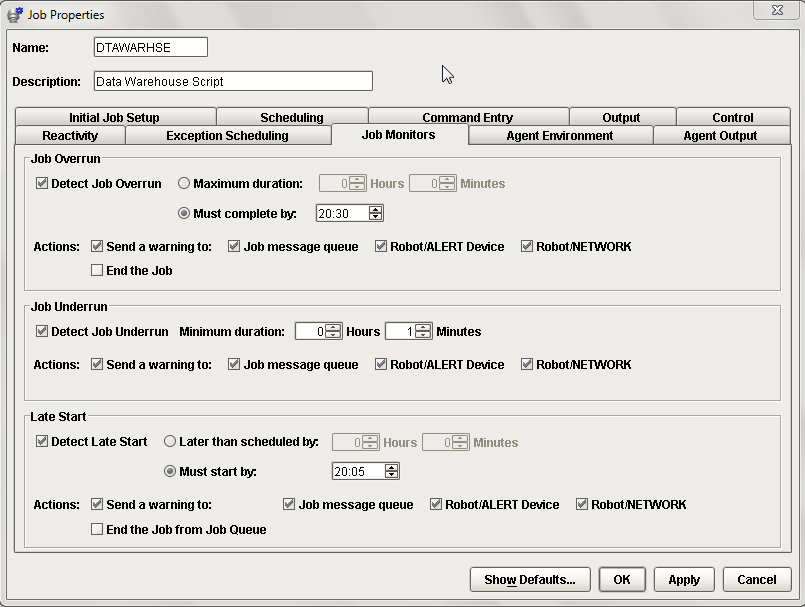
Figure 2: Here's an example of Robot/SCHEDULE Job Monitors.
With Robot/SCHEDULE Enterprise, you can coordinate and manage all of your operating system processes from a single console. Robot/SCHEDULE Enterprise can execute scripts; monitor files, directories, daemons, and services; and help you troubleshoot problems. Give it a free 30?day trial. And check out Help/Systems' other offerings in the MC Showcase Buyer's Guide.

 Business users want new applications now. Market and regulatory pressures require faster application updates and delivery into production. Your IBM i developers may be approaching retirement, and you see no sure way to fill their positions with experienced developers. In addition, you may be caught between maintaining your existing applications and the uncertainty of moving to something new.
 IT managers hoping to find new IBM i talent are discovering that the pool of experienced RPG programmers and operators or administrators with intimate knowledge of the operating system and the applications that run on it is small. This begs the question: How will you manage the platform that supports such a big part of your business? This guide offers strategies and software suggestions to help you plan IT staffing and resources and smooth the transition after your AS/400 talent retires. Read on to learn:
LATEST COMMENTS
MC Press Online