









Tired of manually filling out the audit log?
Do you spend time each day filling out logs to prove to auditors that you have looked at a system report? Do you spend time entering details into a spreadsheet about reports you reviewed? Do you file these reports and then have trouble retrieving them?
Electronic retrieval is best. For example, we previously used a 3995 optical device; today, we use tape or virtual tape. Robot/REPORTS works with many different storage formats, including 3995 optical devices and virtual tape. You can archive your reports by saving them to a save file and then saving them to tape or virtual tape.
Auditors often ask you to prove that you review daily reports and to provide evidence that you document issues related to security, performance, monitoring, change control, and more. The Robot/REPORTS Browser Interface helps you review Good Morning reports from your other Help/Systems products (see Figure 1).
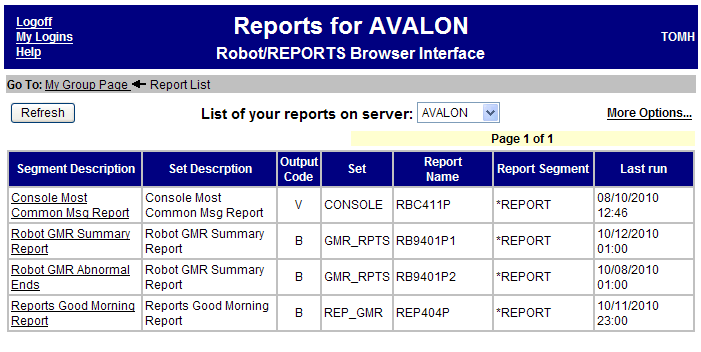
Figure 1: Use the Robot/REPORTS Browser Interface to review Good Morning reports from multiple products. (Click images to enlarge.)
As you review the reports, you can use Robot/REPORTS to place electronic notes in each report to prove to your auditor that you reviewed it (see Figure 2). The best part—your notes are archived with the report.
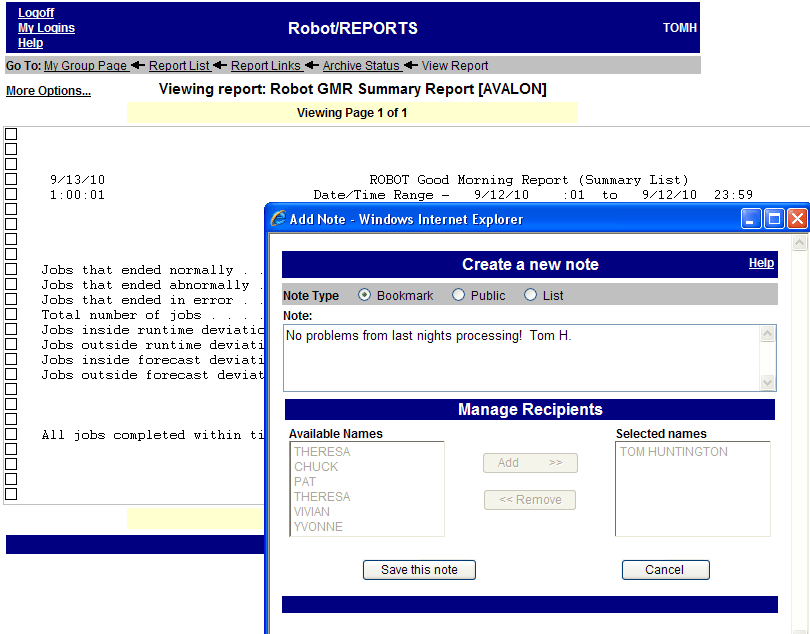
Figure 2: Robot/REPORTS allows you to include electronic notes.
Six months later, when an auditor arrives, you can view a list of reports and retrieve a specific report from your save file, tape, or virtual tape archive. Robot/REPORTS displays your reports and their archive status in a Web browser (see Figure 3). Robot/REPORTS makes it easy to present information to an auditor.
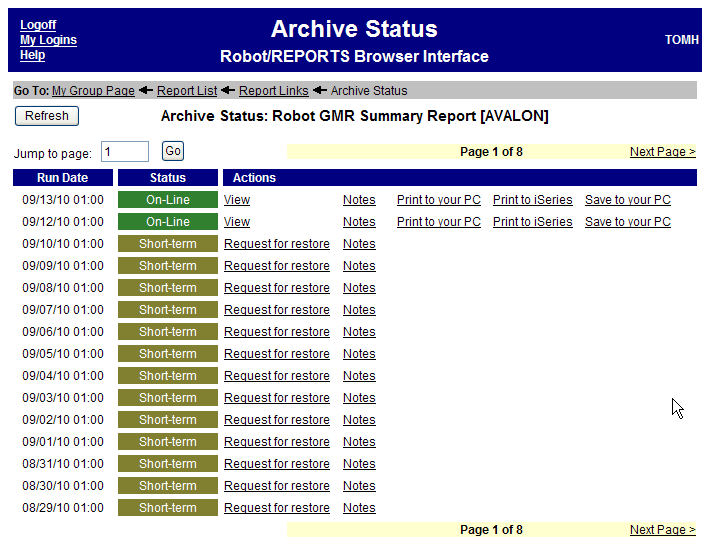
Figure 3: Retrieve a report for the auditor using the Robot/REPORTS Browser Interface.
Join the paperless audit revolution and use Robot/REPORTS to reduce printing and eliminate lost reports. Try Robot/REPORTS free for 30 days and see how you'll save money while you reduce and organize your printed output. And check out Help/Systems' other offerings in the MC Showcase Buyer's Guide.
as/400, os/400, iseries, system i, i5/os, ibm i, power systems, 6.1, 7.1, V7,

 Business users want new applications now. Market and regulatory pressures require faster application updates and delivery into production. Your IBM i developers may be approaching retirement, and you see no sure way to fill their positions with experienced developers. In addition, you may be caught between maintaining your existing applications and the uncertainty of moving to something new.
 IT managers hoping to find new IBM i talent are discovering that the pool of experienced RPG programmers and operators or administrators with intimate knowledge of the operating system and the applications that run on it is small. This begs the question: How will you manage the platform that supports such a big part of your business? This guide offers strategies and software suggestions to help you plan IT staffing and resources and smooth the transition after your AS/400 talent retires. Read on to learn:
LATEST COMMENTS
MC Press Online