









You recently added another new application to your iSeries (System i) that uses IFS directories to store data. You already had Domino information in the IFS, not to mention iSeries Access data. The IFS area continues to evolve and take up more and more of your disk space. Now, the big question is this: Do you have the tools needed to monitor and track the growth of IFS directories on your iSeries?
Many of the tools we typically use to track disk space look only at overall disk space consumption or only at space used by libraries. However, disk space consumption on this platform has changed considerably. IBM continues to put more and more applications into the directories on an iSeries. Domino, WebSphere, and iSeries Access are just a few examples. What if you use SAP or EnterpriseOne on an iSeries? They, too, store data in the IFS. And any product that converts spooled files to PDF puts the PDF conversions in this area.
It's actually very easy to look at the IFS. Just use the WRKLNK command to see the directories on your system. The command also displays libraries and the old folder system (called QDOC). However, you don't have to worry about managing these two file systems; your old methods still work fine.
To monitor IFS growth, we recommend Robot/SPACE. It has an easy-to-use Java Explorer that allows you to open all your directories. You can use Robot/SPACE to view actual directory sizes, establish rules that define which directories you want to see, and report on their growth. Then, you can specify an action to take if the directory exceeds the defined threshold level, based on growth percentage or size. A collection definition establishes these rules (see Figure 1 and Figure 2).
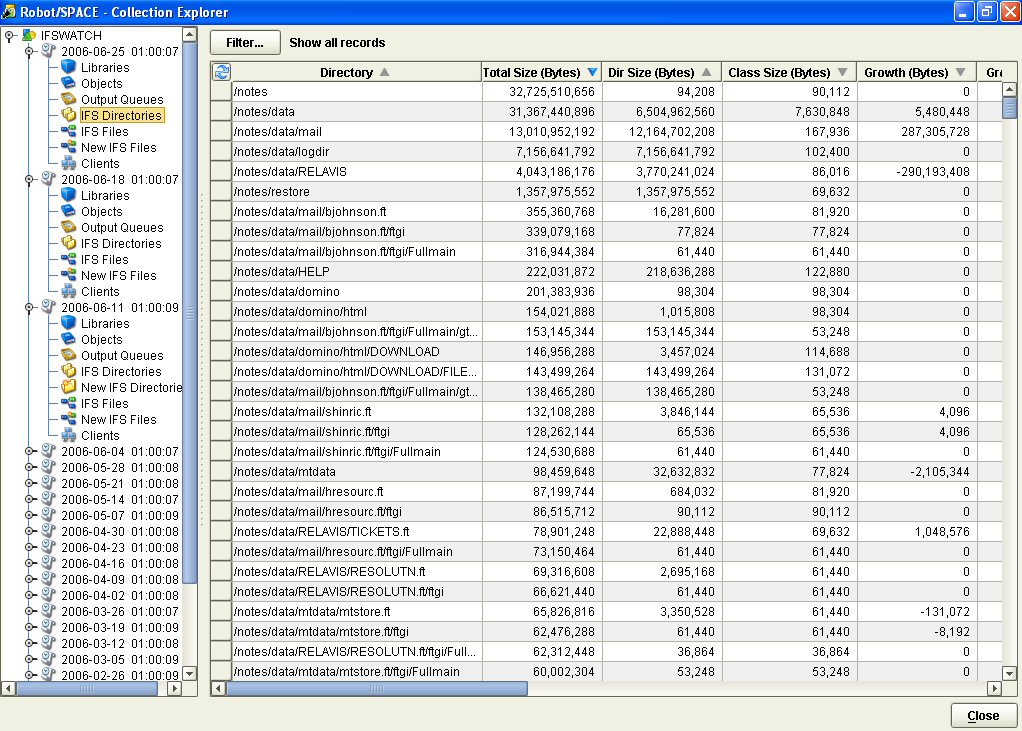
Figure 1: Collections allow you to see your directories. (Click images to enlarge.)

Figure 2: Collection definition events can warn you about growth increases.
Finding Files in the IFS
Can you find the largest files in your IFS? After Robot/SPACE has completed a collection on a directory, you can use Robot/QUERY to build a list of the top files across all your IFS directories. This gives you a nice list of objects to watch or even remove from the system. In addition, the graphical interface allows you to copy and paste data from the Explorer into your favorite spreadsheet application. Robot/SPACE also has an IFS age audit for removing or listing out old, unused IFS files (see Figure 3). This could substantially clean this area up.
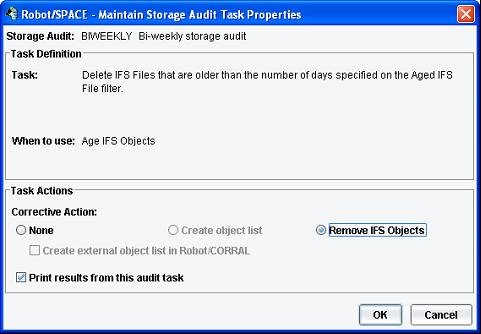
Figure 3: Use Storage Audits to remove old IFS Objects.
Robot/SPACE provides a great insight into the IFS. Give it a 30-day free trial. And check out Help/Systems' other offerings in the MC Showcase Buyer's Guide.
Tom Huntington is Vice President of Technical Services for Help/Systems, Inc.
He can be reached at 952.563.1606 or at

 Business users want new applications now. Market and regulatory pressures require faster application updates and delivery into production. Your IBM i developers may be approaching retirement, and you see no sure way to fill their positions with experienced developers. In addition, you may be caught between maintaining your existing applications and the uncertainty of moving to something new.
 IT managers hoping to find new IBM i talent are discovering that the pool of experienced RPG programmers and operators or administrators with intimate knowledge of the operating system and the applications that run on it is small. This begs the question: How will you manage the platform that supports such a big part of your business? This guide offers strategies and software suggestions to help you plan IT staffing and resources and smooth the transition after your AS/400 talent retires. Read on to learn:
LATEST COMMENTS
MC Press Online