










IBM Trusteer Labs has uncovered a sophisticated Antidot malware campaign, dubbed PhantomCall, that targets users of major financial institutions across the globe.
First observed in April, PhantomCall’s campaign has demonstrated aggressive distribution patterns, with widespread attacks spanning Europe, North America, the Middle East and Asia. In Southern Europe, the campaign has primarily focused on Spain and Italy, with additional activity observed in France. In North America, targets include users of well-known financial organizations in both the United States and Canada. The Middle East has seen a concentrated wave of attacks, particularly in the United Arab Emirates, while in Asia, India has emerged as a notable target. Among all affected regions, Spain and the UAE stand out as the top two most targeted countries. The UAE experienced a surge in attacks during late June and throughout July, while Spain has faced consistently high attack volumes, with a marked increase beginning in mid-August.
The investigation revealed that the campaign uses fake Chrome apps to deceive victims into installing the malicious application. These apps act as droppers, allowing the malware to bypass Android’s accessibility service restrictions that were introduced in version 13, which limit installations from sources outside Google Play.
PhantomCall also enables attackers to initiate fraudulent activity by silently sending USSD codes to redirect calls, while abusing Android’s CallScreeningService to block legitimate incoming calls, effectively isolating victims and enabling impersonation. These capabilities play a critical role in orchestrating high-impact financial fraud by cutting off victims from real communication channels and enabling attackers to act on their behalf without raising suspicion.
Exploiting trust: The dropper’s path to sideloading malware
Why use downloader?
Since the release of Android 13, Google has enforced stricter controls over accessibility services, particularly for apps that are installed outside of official channels, also known as sideloaded apps. These changes made it significantly harder for malware to exploit accessibility APIs, which are the common vector for gaining deep control over victims' devices. Sideloaded apps are now blocked from requesting accessibility permissions by default, making it significantly harder for malware to abuse these services compared to a few years ago.
PhantomCall uses the PackageInstaller.Session API to silently install its malicious payload while bypassing Android 13’s Restricted Settings. This method replaces the traditional use of Intent.ACTION_INSTALL_PACKAGE and is specifically abused to mimic the legitimate installation flow used by the Play Store, allowing the malware to evade the OS-level restrictions introduced in newer Android versions.
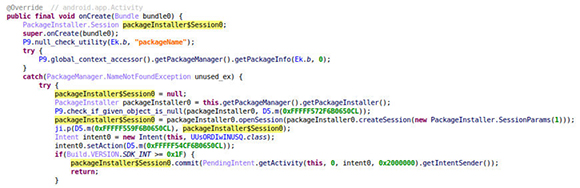
Figure 1 - PhantomCall uses PackageInstaller.Session to silently install its payload and bypass Android’s sideloading restrictions
Importantly, these malicious apps rarely originate from the Google Play Store, which enforces rigorous vetting through automated and manual reviews, behavioural analysis and app reputation checks. Instead, attackers distribute their apps via alternative channels such as phishing websites, smishing (SMS phishing), rogue ads or third-party app stores, where vetting is minimal or non-existent.
Establishing trust
Disguised with the Google Chrome icon, PhantomCall’s dropper tricks users into trusting it, while its true purpose is to deploy the PhantomCall malware. This Antidot variant is both sophisticated and modular, weaponized to become active only after the user enables the accessibility service.
Trust me, I am just an update
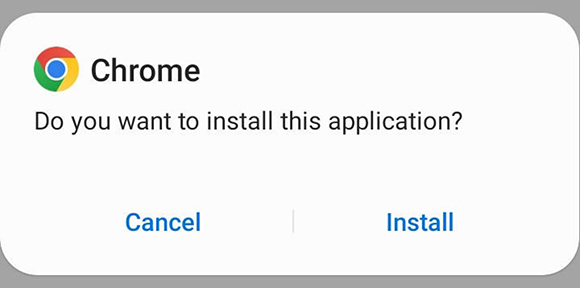
Figure 2 - Installation prompt of the dropper, masquerading as a legitimate Google Chrome app
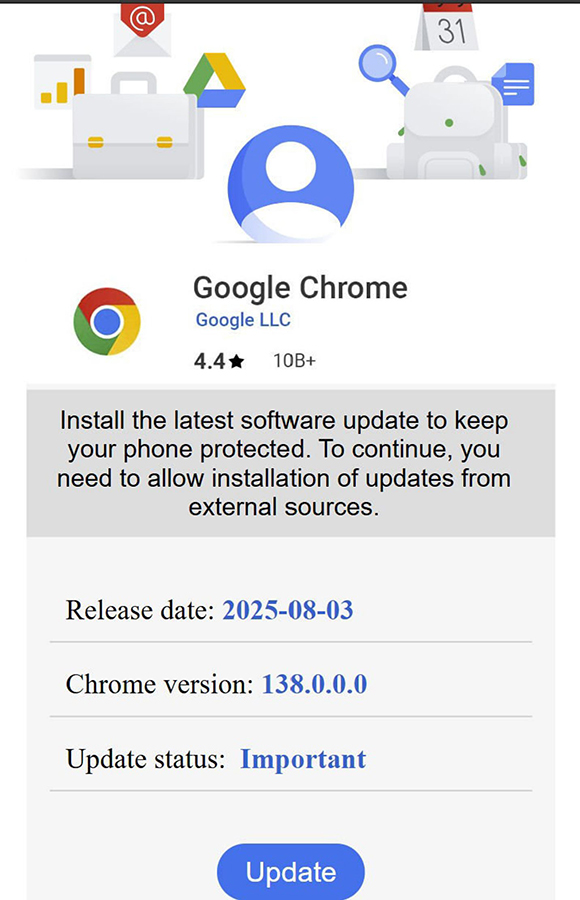
Figure 3 - The malicious dropper uses a WebView to mimic a Google Play update screen, tricking the user into enabling unknown sources to install the banking trojan
The attacker abuses WebView and the @JavascriptInterface bridge to launch a fake browser update prompt, seen in Figure 3. When users click Update, malicious JavaScript triggers a native method that opens the Install unknown apps settings for a fake Chrome app. This social engineering trick enables sideloading and facilitates malware installation.
Enable the downloader permissions to install PhantomCall droppee
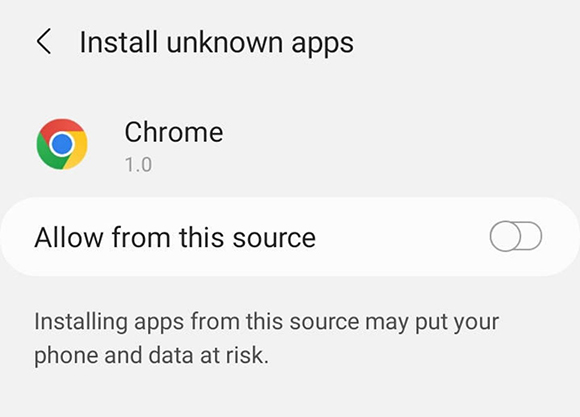
Figure 4- The 'Update' button triggers a redirection to the system settings screen, prompting the user to enable installation from unknown sources. Once toggled, the malicious payload of PhantomCall is silently installed
The canRequestPackageInstalls() method (highlighted in yellow) checks if the user has allowed installations from unknown sources via the fake Chrome settings screen. If not, the app redisplays the deceptive 'Install the latest software update...' prompt to persuade the user to enable it.
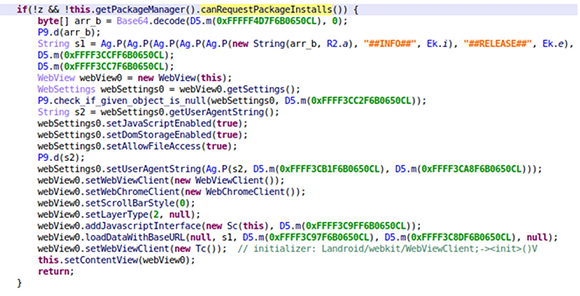
Figure 5 – Dropper’s decompiled code showing a canRequestPackageInstalls check inside the onResume method
Ensure droppee's ideal installation
After PhantomCall is installed, the fake Chrome dropper remains active in the background to monitor the droppee’s status and ensure its accessibility service is enabled. Within the onResume() method of its initialization class, the dropper invokes a check using the AccessibilityManager system service. It retrieves the list of currently enabled accessibility services via getEnabledAccessibilityServiceList() and iterates through them, comparing each service's label (obtained through getResolveInfo().loadLabel(...)) against a predefined string (s3), which corresponds to the droppee’s accessibility service name. If a match is found, it confirms that the user has granted accessibility permissions to PhantomCall. At this point, the dropper exits the loop, allowing the malware to proceed with its malicious operations.
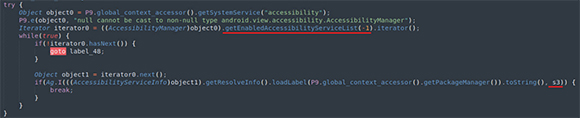
Figure 6 – The dropper’s code uses AccessibilityManager to retrieve all enabled accessibility services via getEnabledAccessibilityServiceList(-1), then iterates through them to check if any match the droppee’s PhantomCall service name (s3) by comparing labels
However, if PhantomCall is not present in the list of enabled services, the dropper invokes the startActivity() method shown in Figure 7 to launch its main activity, generating the deceptive interface shown in Figure 8. This activity manipulates the user into enabling accessibility permissions, here disguised as a feature prompt.

Figure 7 – The dropper calls startActivity() to launch PhantomCall’s main activity, presenting a prompt to enable its accessibility service, triggered only if PhantomCall is installed but the accessibility service remains disabled

Figure 8 – The dropper’s startActivity() call is hooked, with terminal output revealing PhantomCall’s main launcher component by its package and class name, confirming the dropper’s attempt to activate the accessibility prompt
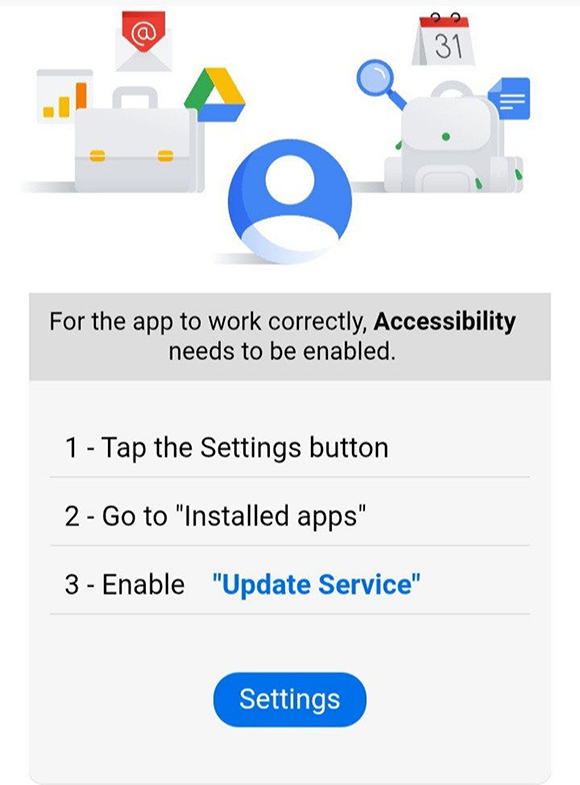
Figure 9 - Deceptive prompt displayed by PhantomCall, urging the user to enable PhantomCall’s accessibility service, a critical step for activating the malware’s core functionality after installation.
This logic ensures that every time the dropper regains focus (when onResume() is triggered), it re-evaluates the accessibility status of PhantomCall, maintaining persistent pressure on the user to complete the necessary steps for full malware activation.
Fraud in silence: PhantomCall’s tactics to reroute and suppress critical calls
Silent control: How PhantomCall blocks calls and manipulates the CallScreeningService
PhantomCall uses the CallScreeningService API to monitor incoming calls and selectively block them based on a dynamically generated list of phone numbers stored in the phone’s shared preferences. The malware checks if the postfix of the incoming number matches any entry in this list, suggesting a targeted filtering mechanism. By intercepting and suppressing these calls, without showing them on screen, logging them or notifying the user, PhantomCall ensures the victim remains unaware of any attempts to intervene. This allows attackers to prolong unauthorized access, complete fraudulent transactions or delay detection, making the malware not just stealthy but strategically dangerous.
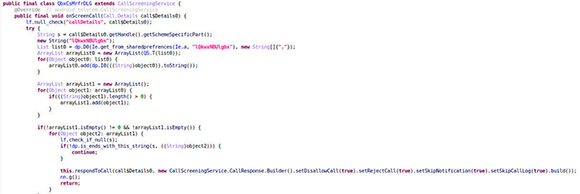
Figure 10 - Code leveraging the CallScreeningService API to inspect incoming calls and match them against a predefined list of numbers retrieved from the malware’s command-and-control (C2) server
USSD manipulation and abuse
PhantomCall’s abuse of USSD functionality becomes evident in its command list management, where we observe both “SendUssd” and “CallForward” operations. The former allows the malware to send any USSD code valid for the device’s SIM and mobile operator, enabling a wide range of actions. The latter is specifically used to execute the *21* number command, which redirects incoming calls, effectively hijacking them for surveillance or fraud.
In the following two images, we can see the code responsible for PhantomCall’s call redirection mechanism. When a phone number is supplied via shared preferences, the malware automatically reroutes all incoming calls to that number. This behavior is a clear indication of its intent to hijack voice communications. By redirecting calls, potentially from banks, financial institutions or law enforcement, to attacker-controlled endpoints, PhantomCall can intercept sensitive conversations, block fraud alerts and maintain uninterrupted access to the victim’s financial activity. This tactic is commonly used in banking malware to delay detection and maximize the window for exploitation.

Figure 11 - The SendUssd command is primed to generate custom USSD codes, enabling the malware to interact with mobile network services, a versatile fraud tool capable of triggering balance checks, call forwarding, or other carrier-level operations

Figure 12 - The callForward command. Demonstrating the generation of the *21* USSD command, used to activate call forwarding to a specified number, followed by #21# to disable it
Conclusion
PhantomCall showcases how mobile banking malware continues to evolve in response to Android’s tightening security landscape. By masking itself as a fake Chrome app, the malware lures users into installing it through social engineering. Once installed, it deploys the PhantomCall malware and abuses accessibility features to perform actions without user interaction. The campaign’s global reach, with notable activity in countries like Spain and the UAE, highlights a well-coordinated distribution strategy targeting users of major financial institutions across multiple regions.
Once installed, PhantomCall activates capabilities that directly support fraud, including silent USSD-based call forwarding and abuse of the CallScreeningService API to block legitimate calls. These features enable impersonation, suppress alerts and isolate victims. As Android continues to harden its defences, PhantomCall stands as a clear example of how threat actors adapt, combining technical sophistication with deceptive delivery to exploit trust and maintain control.
Recommendations
To protect themselves, users should regularly review their installed applications, promptly removing any unfamiliar or suspicious ones.
Additionally, it's essential to monitor email accounts for unusual activity, such as unexpected login attempts, and to keep a close eye on cryptocurrency wallets for unauthorized transactions or unknown actions. Staying proactive and cautious can help mitigate the risks posed by this evolving attack paradigm.
IBM Trusteer helps you detect fraud and malware, authenticate users and establish identity trust across the omnichannel customer journey. More than 500 leading organizations rely on IBM Trusteer to help secure their customers’ digital journeys and support business growth.
Indicators of compromise
PhantomCall Banking Trojan SHA-256
cbe0994fcfbf017babc5bef567f6e3bb540293f2c1e4acb91e9b775008749e16
 Business users want new applications now. Market and regulatory pressures require faster application updates and delivery into production. Your IBM i developers may be approaching retirement, and you see no sure way to fill their positions with experienced developers. In addition, you may be caught between maintaining your existing applications and the uncertainty of moving to something new.
 IT managers hoping to find new IBM i talent are discovering that the pool of experienced RPG programmers and operators or administrators with intimate knowledge of the operating system and the applications that run on it is small. This begs the question: How will you manage the platform that supports such a big part of your business? This guide offers strategies and software suggestions to help you plan IT staffing and resources and smooth the transition after your AS/400 talent retires. Read on to learn:
LATEST COMMENTS
MC Press Online